
Operator Message
Purpose
The Operator Message dialog provides a mechanism for information transfer between FOXMAN‑UN users who are on different shifts or at different geographical locations.
A message can be attached to any NE or FO via the context menu of the NE shown in the map.
The message is a freely editable text and can be used to show e.g. the current state of fault analysis.
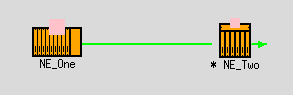
A NE or FO that has a message attached is marked with an asterisk in front of its name or with a speech bubble, depending on the selected Map Style (also see NEM Network Browser Main Window):
A group symbol cannot have a message assigned to it. If there are any messages attached to its members (NEs and FOs) on any level, it shows their total number in front of an asterisk, or in a speech bubble icon, depending on the selected Map Style (also see NEM Network Browser Main Window).

Please note:
Dialog image
Operator Message for <NE_name>

Mandatory entries
Not applicable.
Optional entries
Message text.
Informational content
Not applicable.
Controls (buttons, menu items, etc.)
? Help | Calls the FOXMAN‑UN help viewer and opens this page. |
OK | Applies the modifications and closes the dialog. |
Apply | Applies the modifications without closing the dialog. |
Cancel | Closes the dialog without applying the modifications. |
Related dialogs / windows