
TDM
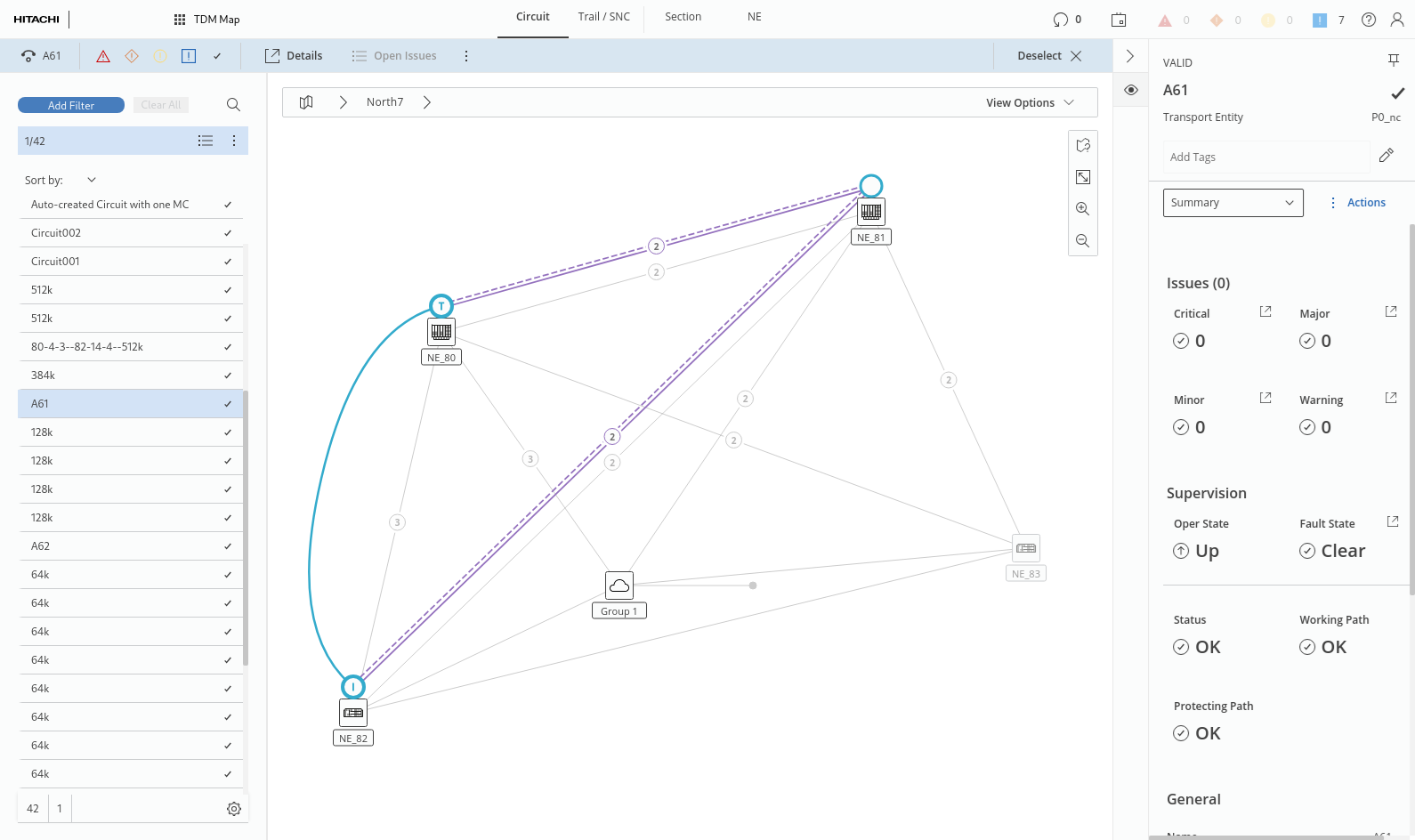
The TDM application provides access to the legacy NP functionality with a network map view, primarily the graphical presentation of the tabs
• Circuit,
• Trail / SNC,
• Section, and
• NE of types FOX61x, FOX51x, FO.
related elements that are part of the NP domain, each of which having its own tab.
For any of the elements selected in the entity browser (left panel) or in the map it provides a details view with information on (as far as applicable):
• basics,
• endpoints,
• service supervision,
• health monitors,
• diagnostic issues,
• used Transport Entity (TE),
• used NEs (with additional extended information on each involved NE),
• used units (with additional extended information on each involved unit),
• used ports (with additional extended information on each involved port).
Circuit
For a selected Circuit, the right panel provides the following details options in the right panel, selectable from the drop-down field:
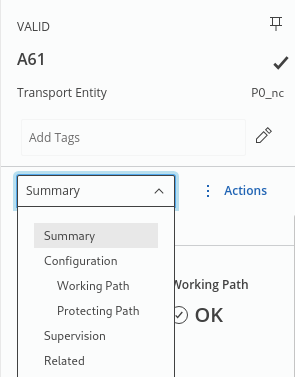
• Summary with
− overall Status, and Working Path, Protecting Path status,
− General circuit information, such as Name, Application, TE ID, Layer Rate, Cost, etc.
• Configuration
Provides general information on the circuit configuration and on its initiator and terminator. For protected circuits, the following options are available:
− Working Path
Provides general information on the working path and on involved NEs, sections, and connections, such as status, number of involved NEs, sections, and connections.
− When expanding “Network Elements”, apart from additional information on the NEs and their used layer rates, the details of TE(s) can be listed via the link icon  .
.
.− When expanding “Sections”, the name, initiator, terminator, status, number of TEs, and layer rates are shown for each of the involved sections.
− When expanding “Connections”, the initiator NE, terminator NE, status, number of TEs, and the layer rates are shown, and an indication on the presence of Working TEs, Protecting TEs, and Topological TEs (via “OK” or “not applicable” icons). The details of involved TE(s) can be listed via the link icon , see more details below.
, see more details below.− Protecting Path
Similar information is available as for the working path described above.
• Supervision (Supervision, Alarms, Actions) where applicable,
• Related (Used By, Using: Network Element, Unit, Port).
Details on involved TE(s) can be listed via the TE(s) link icon . This opens a modal page with more information on the involved TE(s), being topological or non-topological TEs as shown in the following sample with the context menu opened on a topological TE:
. This opens a modal page with more information on the involved TE(s), being topological or non-topological TEs as shown in the following sample with the context menu opened on a topological TE: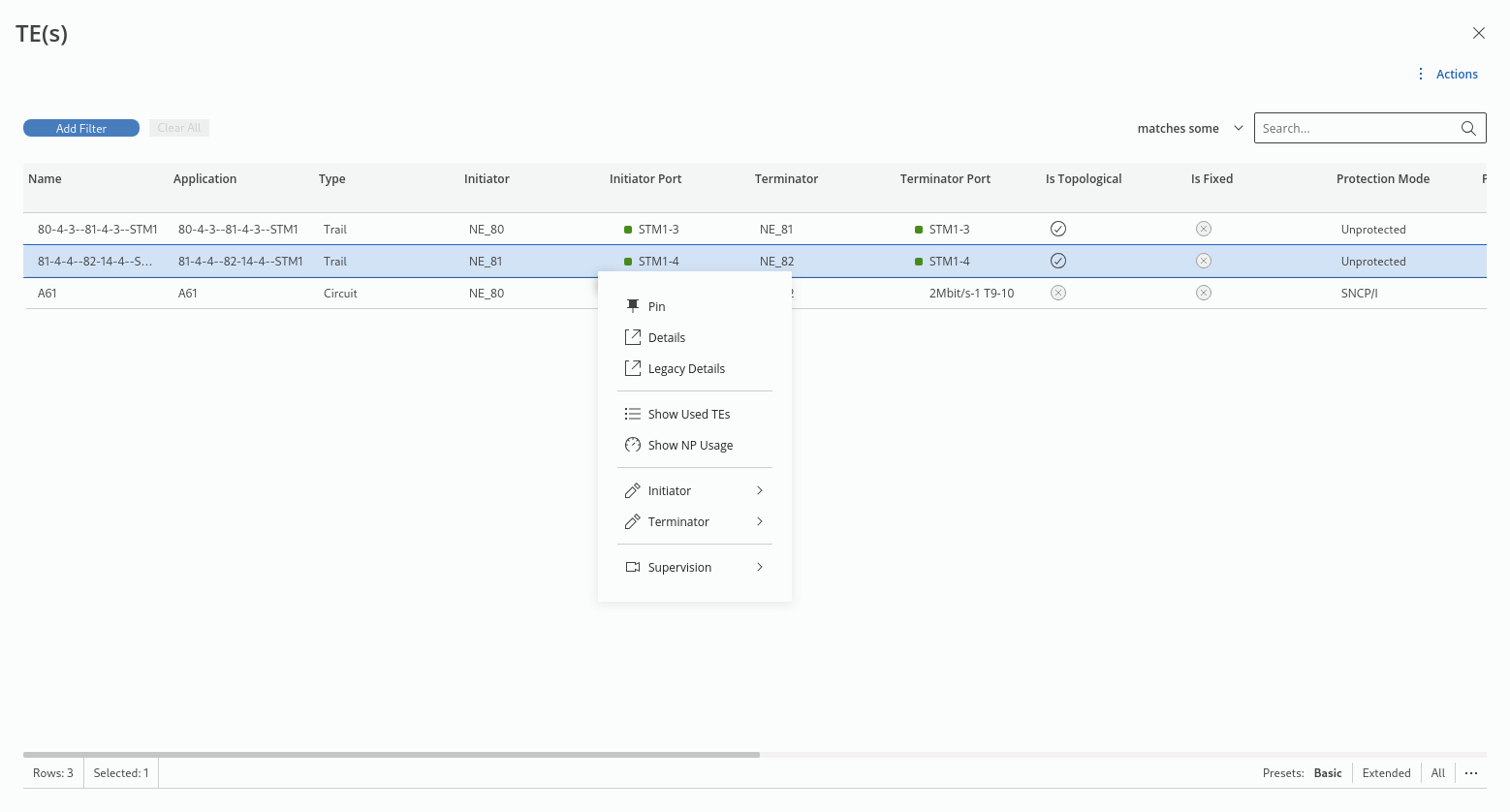
From the context menu on a TE, apart from an additional “Details” page and some more options,
• “Legacy Details” calls the legacy application details for the parent NP Application (also see Application (View/Create/Edit)) with the TE Graph available as shown in the following sample, visualizing the involved logical elements (when Logical Graph is selected):
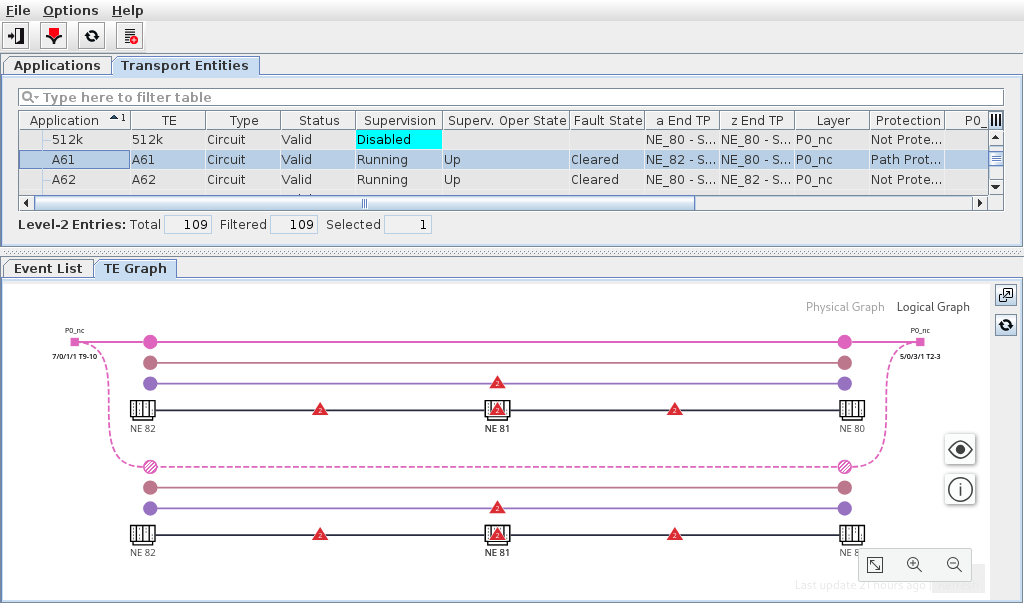
• “Show Used TEs” calls the TEs details page of the parent NP application with details on used TEs for working and protecting path (where applicable);
• “Show NP Usage” calls the legacy dialog “NP Usage” (for topological TEs).
There are some options that depend on whether the TE is topological or non-topological.
Trail / SNC
For a selected Trail / SNC, its graph is shown on the map either as a trail or SNC between two or more NEs, or as an SNC within one single NE.
Trails are shown on the map either
• as curved line between two NEs (e.g. for physical layer such as STMx PMS), or
• as a combination of straight and curved lines, indicating the physical and logical connections, respectively (e.g. for logical layer rates such as P12, VC12, VC4, STMx MS, STMx RS).
For a selected Trail, detailed information is available in the right panel. The details include the options (where applicable):
• Summary (Supervision, General),
• Configuration (General, Initiator, Terminator),
− Working Path (General, Network Elements, Sections, Connections),
− Protecting Path (General, Network Elements, Sections, Connections),
• Supervision (Supervision, Alarms, Actions),
• Related (Used By, Using: Transport Entity, Network Element, Unit, Port).
SNCs are shown on the map either
• as a circle icon on en NE with the number of endpoints (usually 2) for intra-NE SNCs (e.g. for VC12 SNC between two units on an NE), or
• as a combination of straight and curved lines (indicating the physical and logical connections, respectively) between two or more NEs (e.g. for logical layer rates such as P0_nc) with initiator and terminator endpoints indicated in the summary (right panel).
For a selected SNC, detailed information is available in the right panel. The details include the options (where applicable):
• Summary (Supervision, General),
• Configuration (General, Initiator, Terminator),
− Working Path (General, Network Elements, Sections, Connections),
− Protecting Path (General, Network Elements, Sections, Connections),
• Supervision (Supervision, Alarms, Actions),
• Related (Used By, Using: Transport Entity, Network Element, Unit, Port).
Section
For a selected Section, its graph is highlighted on the map as a straight line between two NEs. Detailed information is available as follows:
• Summary,
• Configuration (General, Initiator, Terminator, Basic Configuration, Section),
− MPLS-TP (General, Initiator, Terminator, Utilization, if applicable),
• Health Monitors (General, Details, NE Metrics),
− Statistics (Initiator Port Performance, Terminator Port Performance),
• Supervision (Supervision, Alarms, Actions),
• Issues (number of issues with severity critical, major, minor, warning),
• Related (Used By, Using - with all relevant details of parent and child relations).
NE
For a selected NE, its icon is highlighted on the map as an NE symbol. Detailed information is available as follows:
• Summary,
• Configuration (General, Basic Configuration, CEM & Teleprotection),
− MPLS-TP (essential information on supported features and resource usage),
− DCN (General, Interfaces, OSPF, Diagnostic),
− Synchronization (PETS, PTP),
• Health Monitors (General, Details, NE Metrics),
• Issues (number of issues with severity critical, major, minor, warning),
• Related (Used By, Using - with all relevant details of parent and child relations).