
Advanced Routing
Purpose
Advanced Routing creates a complete LSP automatically based on the configured values of the Automatic Routing Parameters.
If a Service Profile is used, the advanced routing engine will override the service profile’s configured Automatic Routing Parameters in completing the LSP, provided the service profile allows the variation of the parameter(s).

Please note:
The Advanced routing engine, however, will not change the tunnel service profile’s configuration.
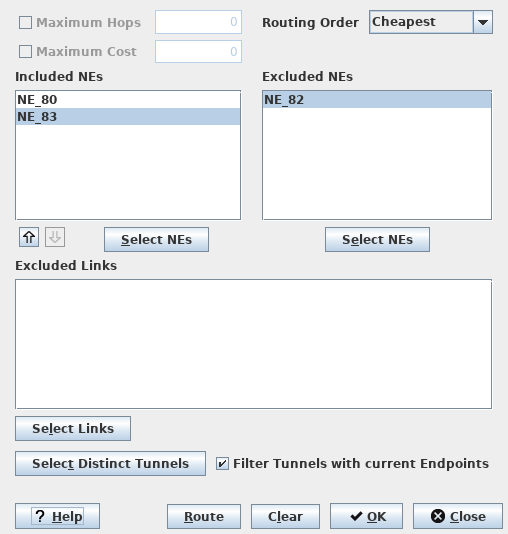
Dialog image
Routing Parameters
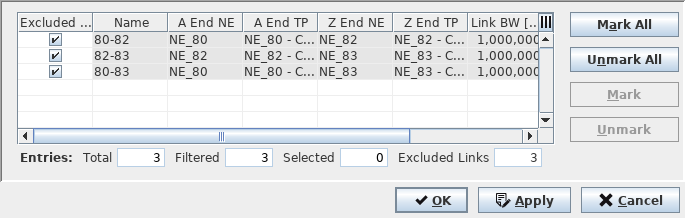
Select NEs (Choose Included NEs / Choose Excluded NEs)
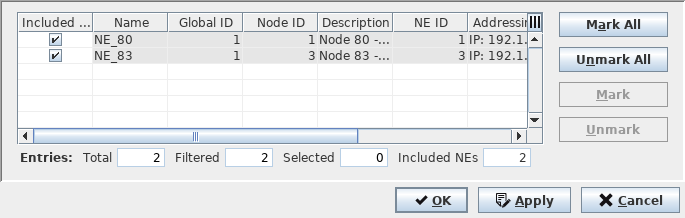
Select Links (Choose Excluded Links)
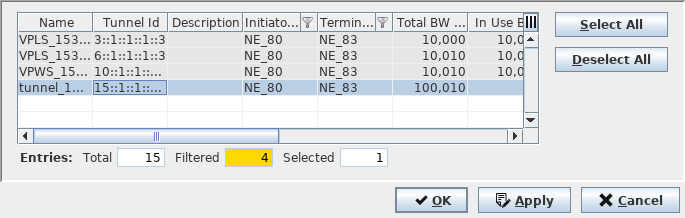
Select Distinct Tunnels
Mandatory entries
Not applicable.
Optional entries
All entries are optional
Informational content
Included NEs | The routing engine always starts with the Initiator NE and ends with the Terminator NE. The “Included NEs” box is the “ordered” allowlist of nodes between the Initiator and Terminator NE. These are the MPLS-TP nodes that will be taken into account during path calculation of the routing engine. The order of the listing of nodes can be changed (via the up and down arrows). The routing engine searches a path from the Initiator to the first node in the list, then to the next and so forth. It applies the concept of Explicit Route Order (ERO) based on RFC 3209. Note: The Maximum Hop and Maximum Cost options are disabled. |
Excluded NEs | Exclude nodes. List of MPLS-TP nodes to be excluded during the path calculation. Note: All nodes from the blocklist are removed from the network graph. Also, links which contain the node(s) present in the blocklist will be removed from the graph. Therefore the nodes and links in the blocklist will not be considered during the automatic path calculation. |
Controls (buttons, menu items, etc.)
Maximum Hops | The maximum allowed number of hops in the path |
Routing Order | Defines the mode of operation of the routing algorithm. With each routing order different constraints are attached. The following options are available: - BW_Optimized: Takes into account the current bandwidth utilization of link (Available bandwidth). Calculated path uses the less utilized links (in terms of bandwidth). (Cost and Number hops are not taken into account). - Cheapest: Takes into account the administrative cost of the link. Calculated path has the lowest overall cost in the network. (Current bandwidth utilization and number of hops are not taken into account). - Shortest: Takes into account the number of hops on the path. Calculated path has the lowest number of hops in the network. (Current bandwidth utilization and link cost are not take into account). Note: Despite routing order mode, if a link will utilize more than 100% of the available bandwidth then the link will be pruned from the graph. Available BW = Link BW - Reserved BW. |
Maximum Cost | The allowed maximum cost of the total path (sum of the MPLS-TP links costs). |
Select NEs: Included NEs | Calls the Choose Included NEs dialog, which allows you to select the NEs to be taken into account during the automatic path calculation. |
Select NEs: Excluded NEs | Calls the Choose Excluded NEs dialog, which allows you to select the NEs to be excluded during the automatic path calculation. |
Excluded Links | Shows a list of links (identified by their Link Names) that are excluded from routing. The list can be modified via the “Select Links” and “Select Distinct Tunnels” command buttons. |
Select Links | Calls the “Choose Excluded Links” dialog to select links that shall be excluded from routing. |
Select Distinct Tunnels | Calls the “Select Distinct Tunnels” dialog to select distinct tunnels that shall be excluded from routing. |
Filter Tunnels with current Endpoints | If marked, only tunnels matching the current tunnel endpoints are shown in the “Select Distinct Tunnels” dialog. |
? Help | Calls the help viewer and opens this page. |
Route | Performs automatic routing of the path with the defined parameters. Note: If the list of excluded links is too stringent routing will fail with an error message similar to “Automatic Routing failed. Causing exception: Path calculation failed (Resources unavailable)” being displayed. |
Clear | Clears all the currently selected parameters without closing the dialog. |
OK | Closes the dialog with setting the Routing Parameters, but without performing the routing. |
Close | Closes the dialog without setting the Automatic Routing Parameters. |
Related dialogs / windows