
Create Remote Command
Purpose
This dialog adds remote command(s) to a foreign object.

Please note:
The “Create Remote Command” table lists all the created remote controls (rc-1…rc-6) on the unit supporting remote control function. It is a must that these remote controls are created/configured prior to adding remote command(s) to FOXMAN‑UN.
The creation of remote control is possible via FOXCST:
• Latched: output keeps the state it is set to, e.g. if the output is set to “ON”, it will remain in that state until the output is set to “OFF”.
• Pulse duration: the time an output will stay in “ON” state until it goes to “OFF” state. The opposite transition cannot be pulsed.
If you want to remove the NE from FOXMAN‑UN and add it back later, make sure that you remove the remote controls before you remove the NE. You can create the remote controls again after the NE is added back to FOXMAN‑UN.
Dialog image
Create Remote Command
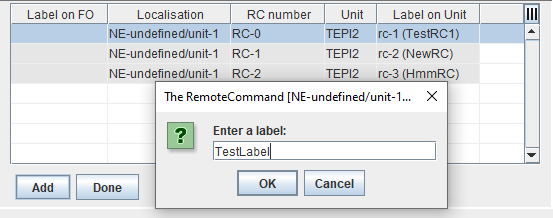
Informational content
• Label on FO: Remote Command label as configured via the “Add” button.
• Localisation: NE-ID/unit slot number.
• RC number: Remote Control logical interface number (n=1…6).
• Unit: the unit supporting Remote Control function.
• Label on Unit: Remote Control label as configured in the unit via FOXCST.
Controls (buttons, menu items, etc.)
Add | Calls a dialog to Enter a “Label on FO” information for the selected RC entry. The label length must be in the range of 3 to 20 characters. Press OK to add the selected RC to the Foreign Object’s Remote Command lists after it is labeled (see Create NE of type “FO” / FO Properties). |
Done | Closes the dialog. |
Related dialogs / windows