
TTP – Create / Properties
Purpose
A Trail Termination Point added to a Foreign Object offers the possibility to create a section with specified properties between the NE of type “FO” and an NE or between two NEs of type “FO”.

Please note:
The “Layer rate” and the “Port type” cannot be modified in the TTP Properties dialog, as this might render an existing section invalid.
Dialog image
Please note:
The Properties dialog is identical to the Create dialog with the exception of the “Address” frame where parameters cannot be modified.
Create TTP
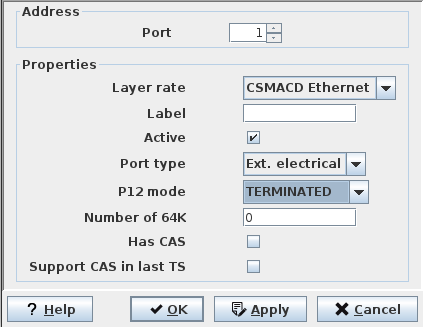
Mandatory entries
Address | A unique TTP address has to be defined. Usually this is the ID (1 to n) of the physical port on the NE. |
Properties | These have to be defined to match the attributes of a section or trail that is required and ends in the NE of type “FO”. Notes: - To be usable for routing in NP, a port needs to be active (mark the checkbox labeled “Active”). - The Label can be selected during creation of the Trail in NP. - “P12 mode”, “Number of 64K”, “Has CAS”, and “Support CAS in last TS” only need to be set for timeslot structured signals with P12 mode = TERMINATED. They can be left at their defaults for layer rates. |
Optional entries
Not applicable.
Informational content
Not applicable.
Controls (buttons, menu items, etc.)
? Help | Starts the FOXMAN‑UN help viewer and opens this page. |
OK | Applies the modifications and closes the dialog. |
Apply | Applies the modifications without closing the dialog. |
Cancel | Closes the dialog without applying the modifications. |
Related dialogs / windows