
Alarm Properties
Purpose
The Alarm Properties dialog is used to view the details of a particular NE alarm record and work instructions in the alarm list. It can also be used to add or modify an operator defined Comment or a Predefined Comment related to the alarm occurrence. It is also possible to acknowledge an active or cleared alarm via the Acknowledge button.
Dialog image
Alarm Properties of <NE_name>
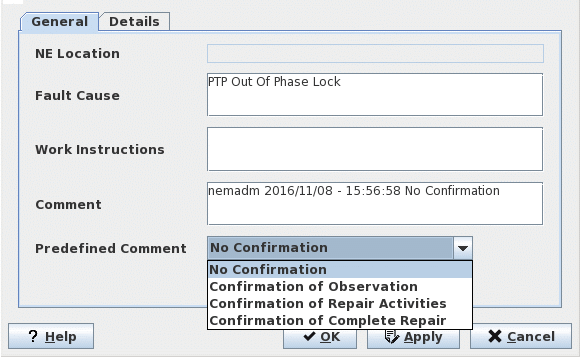
General
NE Location | Applicable for FOX51x NEs only. Displays the current location of the NE as configured via the UCST “NE Configuration-Parameters” menu. |
Fault Cause | A text describing the type of alarm. The layer-subunit identification given in the localization also has to be considered. |
Work Instructions | Displays the work instruction(s) configured in the Alarm Customisation menu. |
Comment/Predefined Comment | A freely definable operator comment can be added. The presence of such a comment is indicated by an asterisk (*) in front of the Localization in the Alarm List. Four predefined comments are available. Pressing the Predefined Comment button shows the selection of available generic text. The current date and time, and the user name are automatically added. A predefined comment can subsequently be modified or mixed with operator defined text. |
Acknowledge | Indicates a possible acknowledgment of (unacknowledged) alarm. |
Details
Localization | The unit name, its card slot, and the layer-subunit identification. |
Severity | The Severity of the alarm. |
Status | Shows “Outstanding” for a currently active alarm or “Cleared” for an inactive, but not yet acknowledged alarm. When a cleared alarm is acknowledged, it is moved to the Alarm History. The history can be accessed from the NEM Desktop. |
Type | One of the five categories each alarm has been assigned to: Communication, Equipment, Environmental, Processing or Quality. |
TP | Termination Point (Trail Termination Point) |
On Time | The time when the NE registered the alarm. The date and time in brackets indicate when FOXMAN‑UN received the alarm. |
Off Time | The time when the NE registered the clearance of the alarm. The date and time in brackets indicate when FOXMAN‑UN received the alarm cleared message. |
On/Off Ack Time | The date and time when a new or a cleared alarm was acknowledged plus the respective user name. |
Controls (buttons, menu items, etc.)
? Help | Starts the FOXMAN‑UN help viewer and opens this page. |
OK | Applies the modifications and closes the dialog. |
Apply | Applies the modifications without closing the dialog. |
Cancel | Closes the dialog without applying the modifications. |
Related dialogs / windows
Alarm List dialog.