
Alarm Customisation – Modify Template
Purpose
The Modify Template dialog allows adding, modifying or removing texts to or from the selected template.
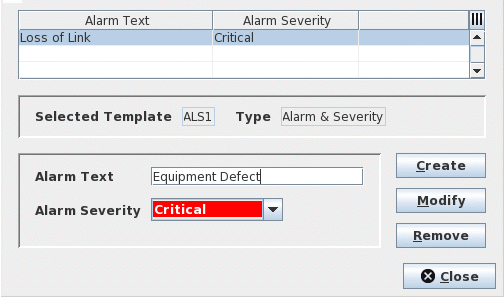
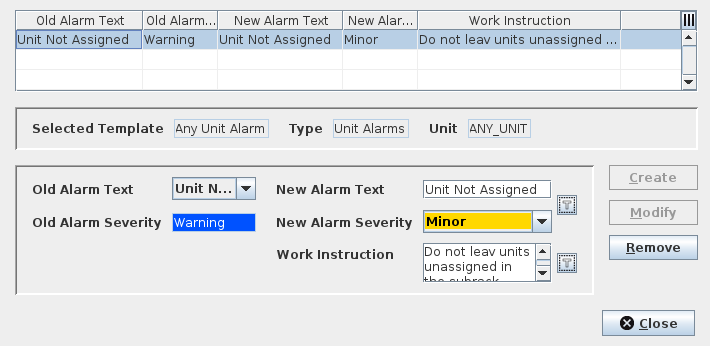
The dialog has different layouts depending on the type of the template to be modified. The images below show the Modify layouts for the Alarm & Severity and Unit Port Alarms templates.
Dialog image
Modify Template
Modify Template
Mandatory entries
Alarm & Severity Template
Alarm Text | Specify a new Alarm Text template to be added to the list of the Alarm & Severity template. |
Alarm Severity | Assign a severity to the new Alarm Text template. |
Work Instruction Template
Work Instruction | Specify new work instruction texts to be added to the list of Work Instruction template. |
Unit Alarms/Unit Port Alarms Template
Old Alarm Text | Select the default alarm text from the list whose text and/or associated severity you want to modify. | |
Old Alarm Severity | The perceived severity of the selected alarm text. | |
Port | Applicable to Unit Port Alarms Template only. Select the specific port of the unit to which the new Alarm Text & Severity template is to be applied. | |
New Alarm Text |  | Edit selected default Alarm Text as required. Calls the “Select from template” dialog to select an existing Alarm Text & Severity template. |
New Alarm Severity | Modify the Alarm Text severity of the new/modified Alarm Text template as required. | |
Work Instruction | | Attach an alarm-specific work instruction to the new/modified Alarm Text template as required. Calls the “Select from template” dialog to select an existing Work Instruction template. |
Optional entries
Not applicable.
Informational content
The Modify Template Table at the top of the dialog lists the collections of Alarm Customisations texts/ templates of a specific Alarm Customisation type.
The information of the Table varies dynamically depending on the type of Alarm Customisation.
A Table for Alarm & Severity template type displays the Alarm Text and Alarm Severity, whereas the Work Instruction template type displays the texts of the Work Instructions.
A Table for Unit Alarms and Unit Port Alarms template types display the following information:
− Old Alarm Text,
− Old Alarm Severity,
− Port (applicable to Unit Port Alarms template only),
− New Alarm Text,
− New Alarm Severity,
− Work Instruction.
Controls (buttons, menu items, etc.)
Buttons
The enabled state of the Add, Modify, and Remove buttons is dynamic and depends on the current user input.
Create | The Create button is enabled only when the editor field contains a non-empty and not yet existing value. Adds and displays the new Alarm Customisation template in the Modify Templates table. |
Modify | The Modify button is enabled when the editor field contains a different value from the selected Alarm Customisation template. Modifies the value(s) of the selected Alarm Customisation. |
Remove | Deletes the selected Alarm Customisation(s) from the Modify Templates table. |
Close | Closes the Modify Templates dialog. |
Table Sorting and Filtering/Export and Printing
Please refer to Table Sorter section for details.