
Configuration Changes
General
To call the configuration tool UCST for a particular NE, the mouse pointer is placed over the NE symbol and the context menu displayed via the right mouse button. Selecting «Configuration» calls the UCST and opens the appropriate configuration file.
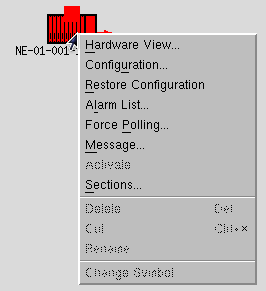
UCST Configuration Tool- NE Menu
Updating the configuration
Once the network element configuration has been updated the operator has the following choices:
• Full Download: Download the entire configuration to the network element, to change the actual configuration with the newly defined one. This function is only used if the configuration identifier or the configuration data in FOXMAN-UN differs to that in the network element. This may occur if a field engineer has locally changed the FOX51x configuration.
A full download can disturb the traffic of some older UBUS units (bit errors, loss of frames, etc) even if the relevant configurations remain unchanged.
• Partial Download: Download only the units that contain configuration changes to the network element without disturbing traffic.
• Upload: Loads the current configuration from the NE and loses the configuration changes.
• Reset Configuration: Loads the configuration from the FOXMAN-UN database and loses the configuration changes.