
FOXMAN-UN System Overview
1KHW029087-R18 Rev. A
Topics and Document Navigation
Topic Group | Path in Navigation Tree | Start Node/Document Name |
|---|---|---|
FOXMAN-UN System Information | FOXMAN-UN | - System Overview (this document), - FOXMAN-UN Deployment Guidelines, - FOXMAN-UN System Description, - FOXMAN-UN Licensing Model, - FOXMAN-UN Logging Feature Description, - Upgrading FOXMAN-UN and FOX61x - Application Note. |
FOXMAN-UN User Manuals | User Manuals | - FOXMAN-UN Installation Guideline, - FOXMAN-UN Help User Manual, - FOXMAN-UN WebUI - Use of Map-based Applications, - FOXMAN-UN under Linux - User Manual, - FOXMAN-UN client for Windows - User Manual, - FOXMAN-UN Networking Package - User Manual, - FOXMAN-UN Northbound Interface - User Manual, - FOXMAN-UN - Main/Standby Solution - User Manual, - FOXMAN-UN Network Monitoring, Health Monitoring Feature - User Manual - DIRAC Installation Instruction, - DIRAC User Manual, - Circuit Emulation Manager (CEM) - User Manual. |
Engineering & Applications | Application Notes / Feature Descriptions | - FOXMAN-UN R17A RHEL9 Hardened Installation, - FOXMAN-UN Client-Server Setup in a Secure Network - Application Note, - FOXMAN-UN Integration with Active Directory (AD) - Application Note, - FOXMAN-UN SNMP Southbound Interface - Application Note, - FOXMAN-UN - Main/Standby Solution- Application Note, - FOXMAN-UN in Firewalled Environment - Application Note, - FOXMAN-UN Role-based Access Control - Application Note, - FOXMAN-UN Tag Management - Application Note, - Usage of Syslog with FOXMAN-UN - Application Note, - FOXMAN-UN Metrics Database - Application Note, - Language Pack - Principles and Installation, - FOXMAN-UN - DIRAC Certificates Recreation. |
Other topics | Safety & Legal Issues | - License Information, - FOXMAN-UN Copyright Declaration. |
Glossary | - Terms and Abbreviations, Glossary. |
How to use the Interface
Button | Function | Remarks |
|---|---|---|
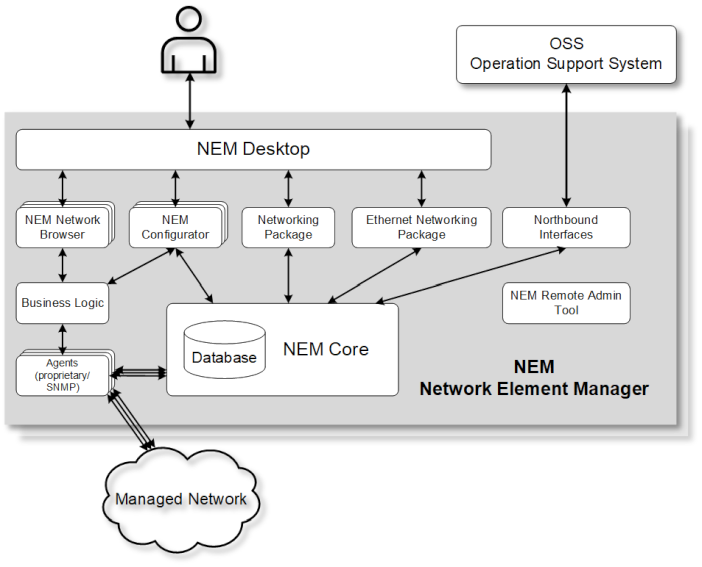
 | Open the documentation start page | The start page displays: - a graphic with a system overview - a table with hints where to find the related documentation - an explanation of the user interface - a feature and limitation overview of the online documentation |
 | Click to open or close the menu navigation tree. | On small displays, the menu navigation tree is hidden automatically when navigating. The menu navigation tree can be opened by clicking this button. |
 | In menu navigation tree: Subtree is closed. Click to open. | |
 | In menu navigation tree: Subtree is open. Click to close. | |
Start Search  | A search across the FOXMAN-UN Online Documentation for one or several terms entered in the input field starts. A pre-selection of the searched items can be done via selecting one or several main topics in the drop-down box. When “All” is selected the search is performed over the complete content. The search results are listed dynamically while entering terms. | |
  | Browse to previous/next page | Browses to the previous/next page of the FOXMAN-UN Online Documentation site. (To go back to the last viewed page, use the direction button of your browser.) |
 | Print page | On Windows desktop systems: Accesses the print function of your Operating System. Other devices: Depends on the local configuration. |
 | Link to a PDF of the entire document | Depending on your local PDF file configuration, a PDF file of the entire document is opened in a new tab of your browser or a save/download dialog is opened. The PDF corresponds to the complete contents of the current document. |
Characteristics of the HTML-based FOXMAN-UN Documentation
This HTML version of the FOXMAN-UN documentation...
adjusts to different screen sizes
This HTML version of the FOXMAN-UN documentation dynamically adjusts to different screen sizes. It can therefore be used ideally on a tablet. If you are unpretentious it also adjusts to a smartphone display.
makes the PDF documents available for download
Via the PDF symbol on the upper right top of the page you can open the entire PDF document of the topic you are currently navigating. The download process and location depends on the settings of your local desktop or mobile device.
allows navigation via the tree structure
The PDF document sections are embedded as separate pages in a navigation tree structure, see left.
The structure nodes of the navigation tree organize the contents and - on a deeper level - offer entry points to the topics of the former PDF document. The parent nodes of these entry points have the same titles as the PDF document titles.
Hitachi Energy Ltd
Bruggerstrasse 72
5400 Baden - Switzerland
Phone: please refer to https://www.hitachienergy.com/contact-us/Customer-Connect-Center
(Customer Connect Center)
(Customer Connect Center)