
Service Alarms
Purpose
The key piece of functionality in the Service Supervision is identifying which services are impacted by traffic affecting equipment alarms. This feature is useful when troubleshooting a service problem.
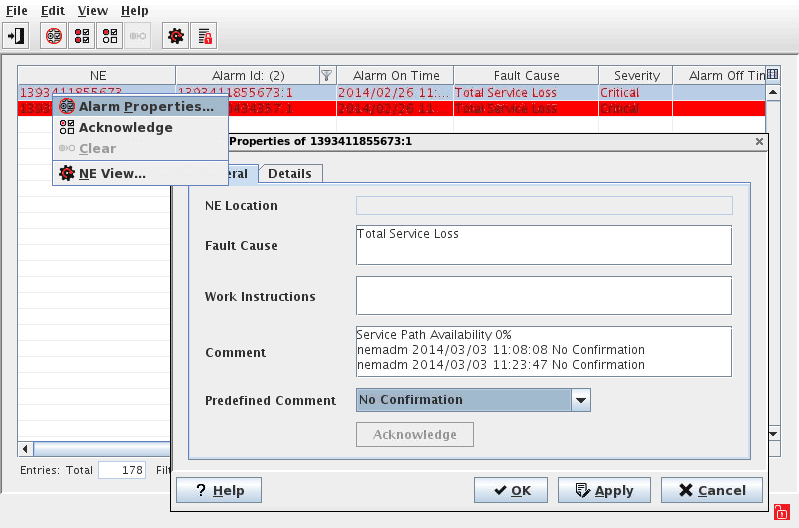
The Alarm List dialog filters the alarms based on the selected element(s), e.g. list only the service alarm of the selected service(s) or list all the alarms of the service(s), service path(s) and service components.

Please note:
Important points about service alarms:
• Only one service alarm is active per service.
• If a service alarm changes severity, the active alarm is cleared and a new alarm is raised.
• Only traffic affecting equipment alarms are monitored for service alarms.
• Only Major and Critical Alarms are monitored for the service alarms.
Service Alarm Severity
− The mapping of equipment alarms to service fault state is configurable via /opt/nem/etc/singlePathServiceAlarmMapping.cfg and /opt/nem/etc/multiPathServiceAlarmMapping.cfg
− A default configuration is pre-installed, the values are shown below:
$ vi singlePathServiceAlarmMapping.cfg
AlarmStatus=Cleared
MinPercentRoutesPrimaryAvailable=100
MinPercentRoutesProtectingAvailable=100
AlarmStatus=Cleared
MinPercentRoutesPrimaryAvailable=100
MinPercentRoutesProtectingAvailable=NA
AlarmStatus=Minor
MinPercentRoutesPrimaryAvailable=100
MinPercentRoutesProtectingAvailable=0
AlarmStatus=Major
MinPercentRoutesPrimaryAvailable=0
MinPercentRoutesProtectingAvailable=100
AlarmStatus=Critical
MinPercentRoutesPrimaryAvailable=0
MinPercentRoutesProtectingAvailable=0
AlarmStatus=Critical
MinPercentRoutesPrimaryAvailable=0
MinPercentRoutesProtectingAvailable=NA
$ vi multiPathServiceAlarmMapping.cfg
AlarmStatus=Cleared
MinPercentRoutesPrimaryAvailable=100
MinPercentRoutesProtectingAvailable=100
AlarmStatus=Cleared
MinPercentRoutesPrimaryAvailable=100
MinPercentRoutesProtectingAvailable=NA
AlarmStatus=Warning
MinPercentRoutesPrimaryAvailable=100
MinPercentRoutesProtectingAvailable=50
AlarmStatus=Minor
MinPercentRoutesPrimaryAvailable=100
MinPercentRoutesProtectingAvailable=0
AlarmStatus=Minor
MinPercentRoutesPrimaryAvailable=50
MinPercentRoutesProtectingAvailable=50
AlarmStatus=Minor
MinPercentRoutesPrimaryAvailable=0
MinPercentRoutesProtectingAvailable=100
AlarmStatus=Major
MinPercentRoutesPrimaryAvailable=50
MinPercentRoutesProtectingAvailable=0
AlarmStatus=Major
MinPercentRoutesPrimaryAvailable=50
MinPercentRoutesProtectingAvailable=NA
AlarmStatus=Critical
MinPercentRoutesPrimaryAvailable=0
MinPercentRoutesProtectingAvailable=0
AlarmStatus=Critical
MinPercentRoutesPrimaryAvailable=0
MinPercentRoutesProtectingAvailable=NA
Dialog image
Alarm List
Mandatory entries
Not applicable.
Optional entries
Not applicable.
Informational content
The list shows the service alarm(s) of the currently selected service(s).
Controls (buttons, menu items, etc.)
Please refer to the Alarm List section for details.
Related dialogs/windows
Service Supervision Service Supervision,