
Set Auto Routing Parameters
Purpose
The dialog is called from the “Options” menu of the NP Main Window dialog.
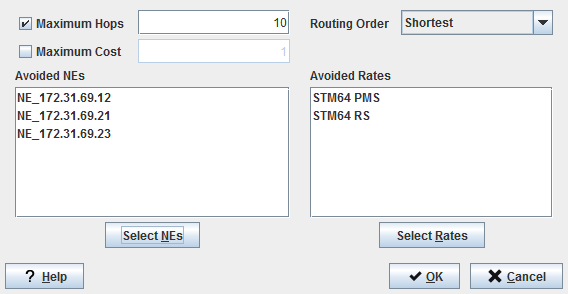
This dialog is used to specify the parameters used by the Automatic Routing facility of the FOXMAN‑UN NP:
− Max Hops,
− Max Cost,
− Routing order,
− Network Element to be avoided in the Route,
− Layer Rates of Trails to be avoided in the Route.
Dialog image
Set Automatic Routing Parameters
Mandatory entries
Not applicable.
Optional entries
All entries are optional.
Informational content
Maximum Hops | The route should not exceed specified value. |
Maximum Cost | The cost of the route should not exceed specified value. |
Routing Order | The route should be either Shortest or Cheapest, depending on your requirements. |
Avoided NEs | Used to specify Network Elements through which the routing is not allowed. |
Avoided Rates | Used to specify Layer Rates of Trail through which the routing is not allowed. |
Controls (buttons, menu items, etc.)
Maximum Hops toggle | Activates or deactivates the Max Hops text field. |
Maximum Cost toggle | Activates or deactivates the Max Cost text field. |
Routing Order | - Shortest, - Cheapest. |
Select NEs | Calls the “Choose Avoided NEs” dialog. |
Select Rates | Calls the “Choose Avoided Rates” dialog. |
? Help | Calls the help viewer and opens this page. |
OK | Applies the entries and closes the dialog. |
Cancel | Closes the dialog without applying the entries. |
Related dialogs / windows
NP Main Window,