
NEM Desktop
For more details see section NEM Desktop.
The NEM Desktop is the control panel from where all functions of the NEM system are started. The desktop itself is started by connecting it to an active NEM core via the login procedure.
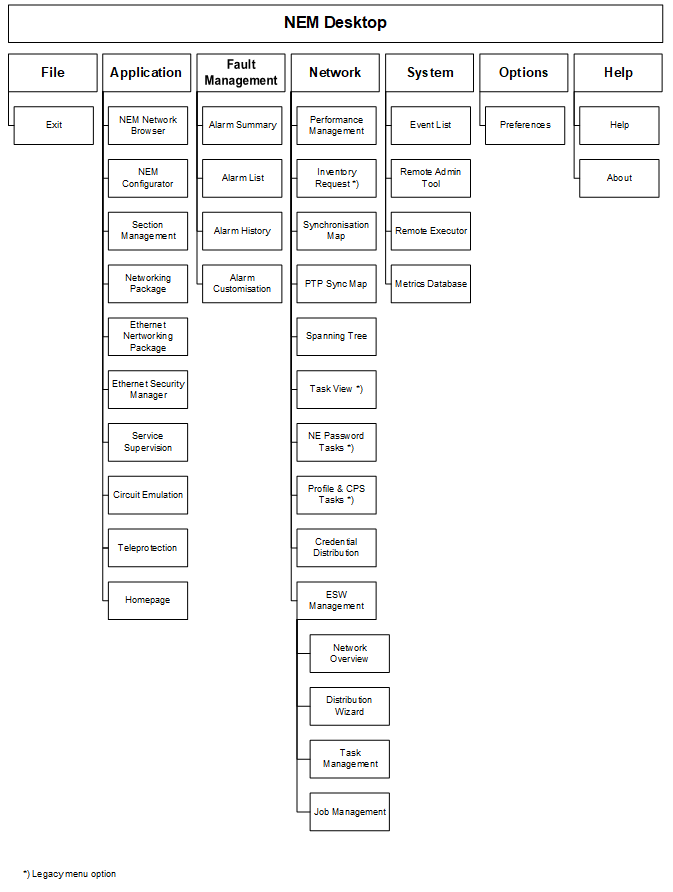
The NEM Desktop has the following menu structure:
Applications
The NEM Network Browser, NEM Configurator, Section Management, and – if licensed – the Networking Package, Ethernet Networking Package, and Service Supervision can be initialized with the connected NEM core.
Fault management
Alarm functions include summary, list, and history. Additionally, if required, the standard settings alarm severities and alarm texts can be modified on a global, per NE or per unit/subunit basis via the Alarm Customisation functions.
Network functions
Reporting functions like performance management, inventory, and the network clock synchronization maps as well as network wide distribution of NE credentials, SSH keys, profiles, and embedded software management are handled in this group.
System functions
An event list records all important activities in the managed network. Up to 100'000 entries are stored in the database and can be browsed through. The remote admin tool provides you with administration functions for the NEM core services, database backups, and main/standby server configuration. The remote executor allows you to execute scripts for various purposes. A metrics database provides means for setting up system performance graphs for both the managed network and the NEM server.
Options
Preferences for GUI elements and their look & feel can be set.