
Select Initiator/Terminator NE
Purpose
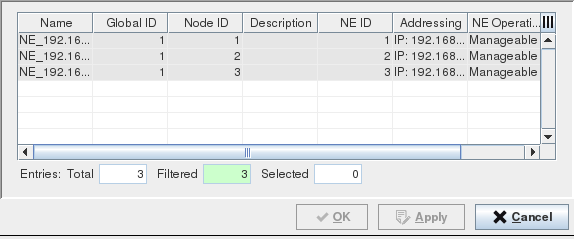
This window allows you to select the A End NE or Z End NE from the ENP Domain’s member NEs.
Dialog image
Select Initiator or Terminator NE
Mandatory entries
Select one of the listed NEs.
Optional entries
Not applicable.
Informational content
Name | Configured NE name. |
Global ID Node ID | The pair of Global ID and Node ID should be unique. |
NE ID | The NE ID automatically set by the FOXMAN‑UN system. |
Addressing | IP address of the node. |
Support QoS | A mark in the checkbox indicates that the NE supports QoS. An empty checkbox indicates that the NE doesn’t support QoS. |
NE Operational State | The status of the node as defined by the core. |
NE Type | Shows the NE type, e.g. FOX615, FOX612, or FOX611. |
Controls (buttons, menu items, etc.)
OK | Applies the selected A/Z End NE and closes the dialog. |
Apply | Applies the selected A/Z End NE without closing the dialog. |
Cancel | Closes the dialog without applying the modifications. |
Help
? Help | Calls the help viewer and opens this page. |
Table Sorting and Filtering/Export and Printing
Please refer to Table Sorter section for details.
Related dialogs / windows