
Manual Routing
Purpose
When a tunnel is created, the route has not been defined thus the Path contains a “Hole”. The user can select Manual, Automatic or Advanced Routing to complete the route.
The Manual Routing window returns a list of possible MPLS-TP links with enough available bandwidth to reach the Next-Hop MPLS-TP node. The user has to manually select each “Hop” until the path is complete.
The listed next-hop links must fulfill several constraints:
− the links must have enough available bandwidth;
− to prevent loops, the links leading to nodes already in the path are not listed. This implies that a link can only be used once.
Dialog image
Manual Routing – Next Hop
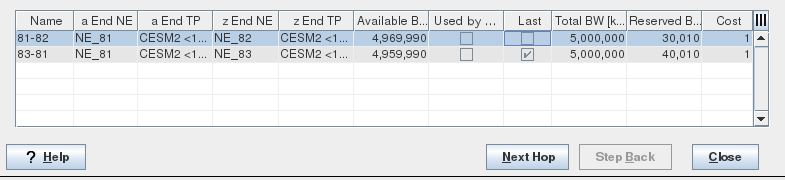
Manual Routing – Finish

Mandatory entries
Select one of the listed MPLS-TP links
Optional entries
Not applicable.
Informational content
Name | The specified section (Links) Name as configured via section management. |
A End NE | The A End NE |
A End TP | The A End Termination Point Label or unit/slot#/MPLS-TP port#. |
Z End NE | The Z End NE |
Z End TP | The Z End Termination Point Label or unit/slot#/MPLS-TP port#. |
Available BW [kbit/s] | Bandwidth attribute used for the LSP path computation. Available BW = Link BW - Reserved BW Note: All the proposed links’ “Available BW” can satisfy the path’s bandwidth requirement provided the link bandwidth is not set to a value above its physical capabilities. |
Used by other path | Indicates that the link is already used by the working/protecting path. |
Last | Indicates that the proposed link is the last hop to complete the path. |
Total BW [kbit/s] | Link bandwidth computed from physical port characteristics of the selected MPLS-TP endpoint ports, e.g. CESM1 port-1. |
Reserved BW [kbit/s] | Total allocated bandwidth of all configured (saved in the database) but not yet deployed Tunnels using this link. |
Cost | The configured link cost. |
Controls (buttons, menu items, etc.)
Next Hop | Lists all possible links to reach the next-hop node. To prevent loops, the links leading to nodes already used in the path are not listed. When the Next-Hop is selected, - the corresponding NE and MPLS-TP Link are added to the path session, - the tunnel’s configured BW is added to the selected MPLS-TP link’s reserved BW, - new possible next hops are shown. |
Step Back | Deletes the last hop and displays the previous hop(s). |
Finish | Creates the last hop and closes the dialog. |
Close | Closes the dialog without creating the hop. |
Help
? Help | Calls the help viewer and opens this page. |
Table Sorting and Filtering/Export and Printing
Please refer to Table Sorter section for details.
Related dialogs / windows