
Audible Alarm
Purpose
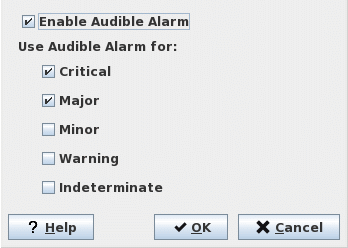
The “Audible Alarm” dialog allows enabling or disabling the audible alarm and selecting the relevant alarm severities responsible for triggering it.
Dialog image
Audible Alarm
Mandatory entries
Not applicable.
Optional entries
Enable Audible Alarm | If ticked, sounds the audible alarm for as long as there is at least one active alarm in the managed network with one of the severities selected below. |
Use Audible Alarm for | Select the severities of the alarms that are to sound the audible alarm. Any combination is possible. |
Informational content
Not applicable.
Controls (buttons, menu items, etc.)
? Help | Calls the help viewer and opens this page. |
OK | Saves the settings and closes the dialog. |
Cancel | Discards any modifications to the settings and closes the dialog. |
Related dialogs / windows