
Agent Statistic
Purpose
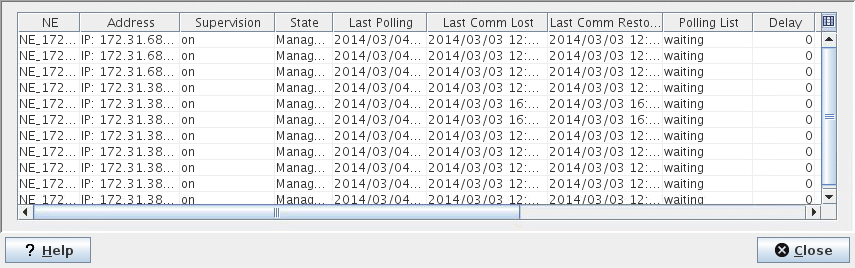
After selecting one of the active agents in the management network, this dialog presents the polling statistic for all NEs assigned to it.
The data provides information on the current state of the management communication to the NEs as well as a history of past failures. This allows judging the reliability of the management network and detecting problems with alarm flooding.
This dialog is called from the Agent’s context menu under NEM Configurator → NE Browser.
Dialog image
Agent Statistic: Main EA
Mandatory entries
Not applicable.
Optional entries
Not applicable.
Informational content
List of the polling statistic for all NEs assigned to the selected agent.
NE | Shows the name of the NE. |
Address | Shows the address of the NE. For NEs that are addressed via IP, the IP address is shown. |
NE Type | Shows the NE type. |
Supervision | Shows whether supervision of the NE is on or off. |
State | Shows the NE management state, i.e. whether the NE is manageable or not. |
Last Polling | Date / time of the most recent polling. Apart from the regular polling each Severity causes a poll out of sequence of the NE. |
Last Comm Lost | Date / time when the NE became unmanageable (most recent occurrence). |
Last Comm Restored | Date / time when the NE became manageable again (most recent occurrence). Together with “Last Comm Lost” shows the duration of the last unmanageable period. |
Polling List | Waiting: Normal situation, the NE is polled in the normal sequence. Delayed: The event filtering of FOXMAN‑UN has counted too many alarms at the last poll and has delayed the next poll by a time it calculated |
Delay | Remaining time to the next poll. Click “Refresh” for an update. |
Successful Requests | Number of successful polls since the agent was started. |
Failed Requests | Number of polls without or with a corrupt answer from the NE. |
Comm Lost Count | Count of “Communication Lost” events since the agent was started. |
Controls (buttons, menu items, etc.)
Table Sorting and Filtering/Export and Printing
Please refer to Table Sorter section for details.
? Help | Calls the FOXMAN‑UN help viewer and opens this page. |
Close | Closes the dialog. |
Related dialogs / windows