
Endpoint Information
The Trail Termination Point (TTP) dialog in The visualization of an Endpoint allows the visualization of the functionality of the Termination Endpoints.
This dialog is called from the main Application dialog’s context menu: “Details A End TP” or “Details Z End TP” s shown in Getting information on the Endpoints below:
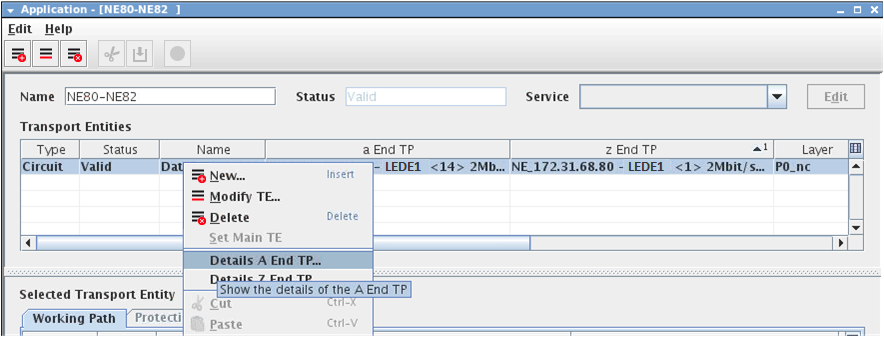
Getting information on the Endpoints
The TTP dialog is used to provide physical characteristics of a TTP. This is a read-only dialog, no modification can be made to the displayed information. Those configuration parameters can be modified in the NE configuration using the CST.
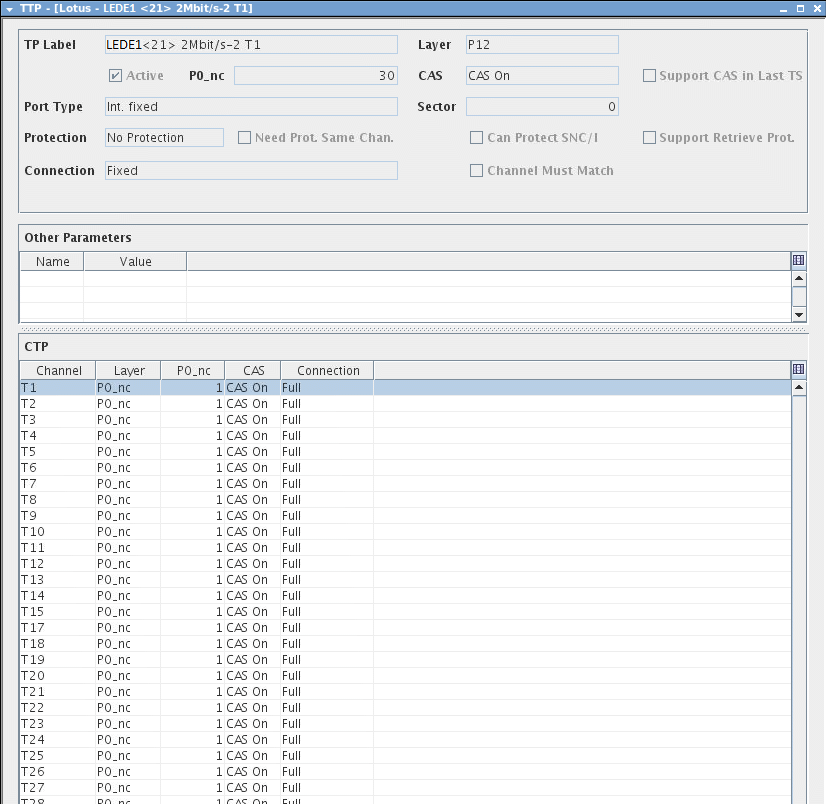
The visualization of an Endpoint
TP Label | Identifies the TTP. |
Layer | Defines the Layer rate of a TTP. |
Active | Operational status of the TTP. |
P0_nc | Shows the amount of usable nx64 kbit/s |
CAS | Shows whether Channel Associated Signaling is supported or not. |
Support CAS in Last TS | Mainly used in xDSL applications. |
Port Type | The Port Type can be: - Ext. Optical, - Ext. electrical, - Int. section, - Int. logical, - Int. fixed, - Int. floating, - Ext. SFP, - Ext. radio. |
Sector | Shows the FOX51x bus sector. |
Protection | Indicates the mode of protection this TP supports. |
Need Prot Same Chan | This parameter specifies that a termination point connection as AWork must have a similar channel on the AProt of the connection. Note: Only used for MEGIF unit. |
Can Protect SNC/I | The Termination Point supports SNC/I protection. |
Support Revertive Prot | The Termination Point supports Revertive protection. |
Connection | Indicates the connection of this Termination Point. |
Channel Must Match | When cross-connected to another Termination Point, this later must have the same channel. This is used to model the KLM constraint for SDH units (SYNIO/SYNUF/SYNIF). |