
Circuit Creation

Please note:
The provisioning example described in this section assumes the following:
→ NP database is initialized.
→ NP/BP databases are synchronised.
→ No pending changes indications.
→ No application conflict detected.
In case of any of the above listed issues, the Conflict State icon on the tool bar of the application window is colored orange, and a click on the icon provides more information.
Please refer to section Main GUI Status Indications and section User Work Flow: Application Create/Edit.
1 Create a new Application by calling the Application dialog via NP main Window menu: File > New Application
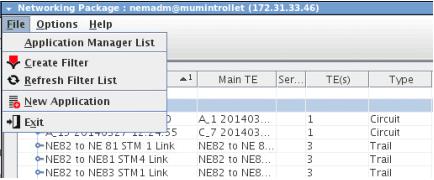
Calling Application dialog via Main Window
2 Create new Transport Entity:
− from the Application dialog call the TE dialog:
Edit > New
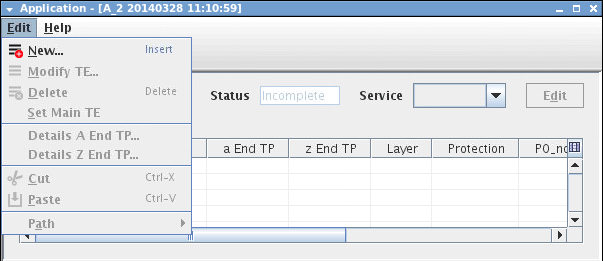
Creating new TE from Application dialog
− Create new TEs by specifying the following between a End and z End NEs: VC4 Trail, V12 Trail and P0_nc Circuit.
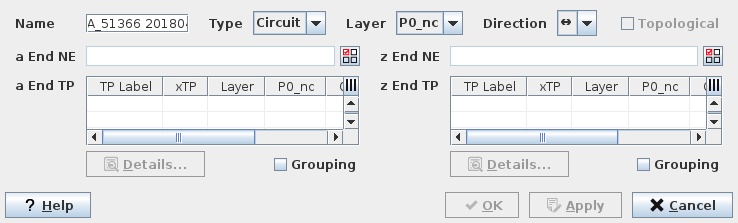
Defining the new TE parameters
− click “OK” to go back to Application dialog.
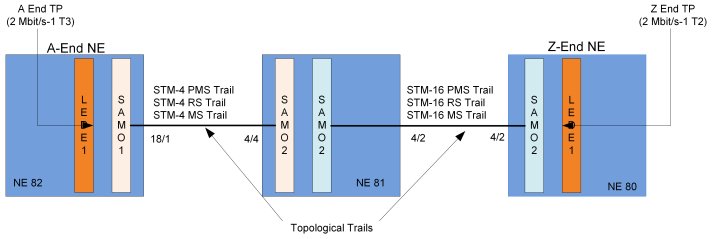
Transport Entity (Circuit) created with extremities defined