
Adding Services
System Services are added to Service Supervision via the context menu of an ENP or NP service. The context menu of a service in ENP or a TE in NP includes the option “Supervision” with the following commands:
• Enable

• Disable

• Resume

• Pause

In addition to these commands, service configuration can be reloaded, details can be shown, and the service can be shown in the Service Supervision dialog via the following further “Supervision” commands:
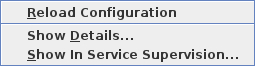
Reload Configuration will reload the configuration from the network (NEs) to make sure the information in the database is up to date in case of recent changes to the service.
Showing details opens a hierarchical view of the service structure in the Service tab and related alarms in the Alarm tab.
When “Show In Service Supervision...” is selected, the service is shown in a filtered view of the System Services tab of Service Supervision.