
VPLS Tab
A Virtual Private LAN Service (VPLS) is a multipoint-to-multipoint Ethernet bridging service. Within the VPLS instance, all member nodes of the mesh type are connected with Pseudo Wires in a full-mesh topology.
The VPLS creation also supports H-VPLS, i.e. mesh/spoke network topologies, and PE Dual Home topologies, i.e. H-VPLS PE dual-homing protection.
On each node, the Pseudo Wires are connected to a Switching Virtual Interface (SVI). A local VLAN of the node is associated to the SVI. Bridge ports are attached to the VPLS if they share the same VLAN ID with the SVI.
The VPLS Tab displays all the saved and/or deployed VPLS. It likewise allows you to create, modify, see details, deploy or delete VPLS.
The VPLS are listed in a hierarchical table that can be expanded or collapsed. The top level displays all VPLS Services. The second level displays all member VPLS NEs. Under each NE, all member ports, Pseudo Wires, and tunnels are displayed. Details of every VPLS can be shown via the “Details VPLS...” menu option.
VPLS can be modified or deleted from this tab.
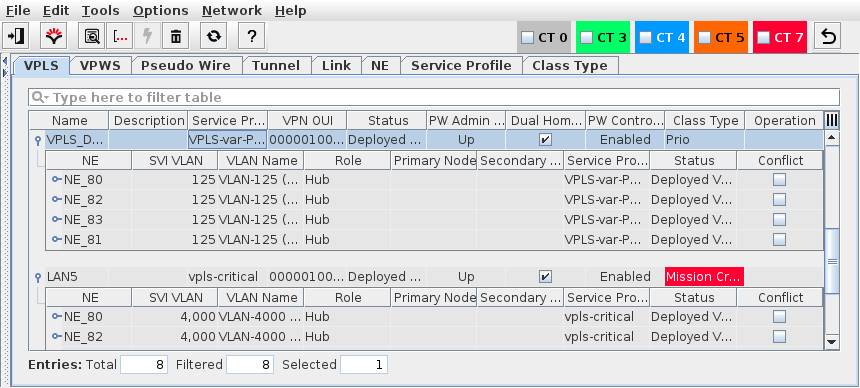
ENP VPLS Tab
Any VPLS that is saved in the database or deployed to the network can be visualized in a graphical viewer with many view options.
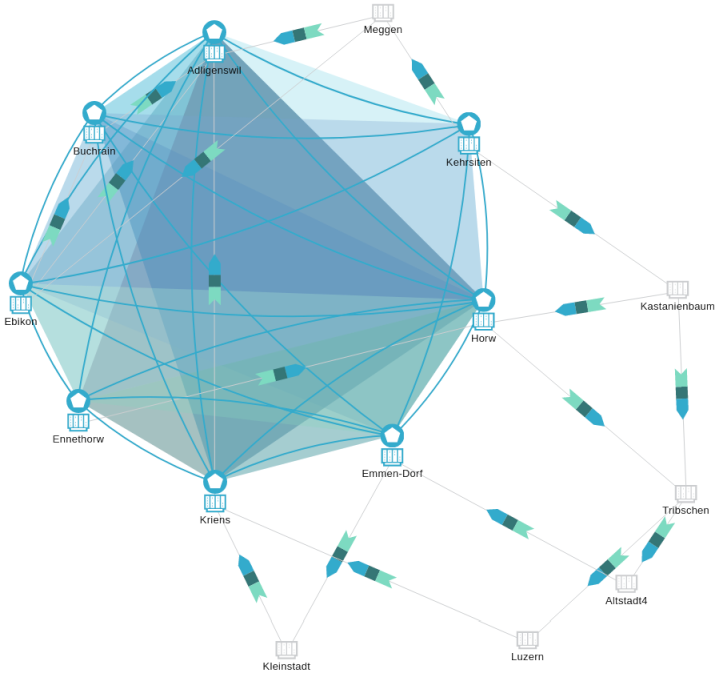
VPLS Graph - physical, Example