
Spanning Tree Map
The spanning tree map displays the spanning tree view of the selected NE with STP configured.
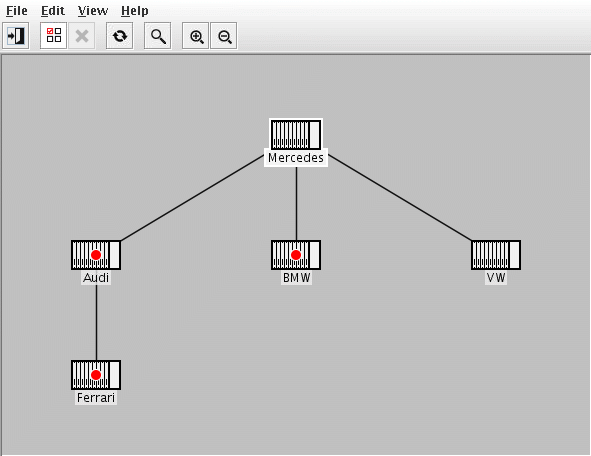
• All bridge nodes show the bridge name (the NE name known in the FOXMAN-UN). If the bridge has a port with status Blocking, this is indicated by a red circle marker.
− A tool-tip on the bridge node shows additional information of the bridge:
Parameter | Description |
|---|---|
Name | The RSTP Bridge Name. Note: Currently “Customer Bridge” is the only bridge. |
Priority | The configured Local/Root bridge priority. |
Own MAC Address | The Local bridge MAC address. |
Root MAC Address | The Root bridge MAC address. |
Blocking ports | The slot/port# of ports which are in Discarding state. |
− a double click on bridge node opens the FOXCST of the corresponding NE with user class “Information”.

Please note:
Verify that the FOXCST is defined in the “client_cst_doubleclick_default” parameter of /opt/nem/etc/cst.conf.
• Links
− Links are represented with dark gray lines between bridge nodes. Only links with forwarding endpoints are shown.
− a double click on a link opens the Section Manager and the section on which the link relies is shown.
− a tool-tip on the link shows additional information of the link end ports
Parameter | Description |
|---|---|
Port Roles | Shows the link end port’s role. Note: In RSTP, the port role is not applicable and will be shown as “N/A”. |
Priorities | Shows the configured port priority. |
Port State | Shows only the Forwarding port state (since only forwarding links are shown in the map) |
Path Cost | Shows the administratively assigned value for the contribution of this port to the path cost towards the spanning tree root. |