
Section Definition
To create trails from one end of the network to another, it is necessary to define sections between network elements. These represent the actual physical connections between two network elements, within which logical connections can be defined.
Sections between network elements can be defined for different types of end node combinations:
• NE to NE,
• NE to Foreign Object (FO),
• FO to FO.
The operator can define the sections using the Section Editor:
The operator can define, modify, delete sections and launch the NP GUI for the specific section using the «Section Management». This dialog gives a list of all existing sections.
For a new section, the «Create Section» dialog allows choosing the endpoints (NE and termination point), the layer rate and cost as well as specifying section name.
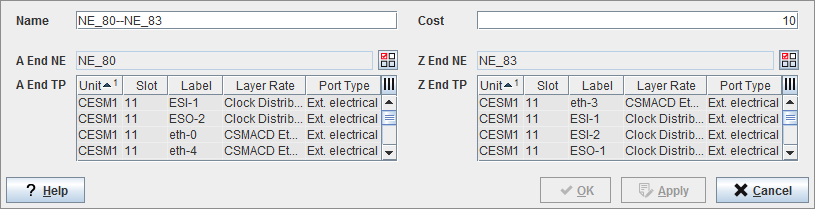
Network Configuration: Section Creation
On a map, a section can be comfortably created in Edit mode using the NE context menu «A-End Section» or «Z-End Section», which calls the Create Section dialog.
Once sections are defined these can be displayed and alarmed.
The “Open-Circuit” context menu launches the NP GUI for the specific section. The NP GUI will show the circuits or trails going over the section.
By double clicking on a section on the Map the operator can obtain a detailed information of the section.