
Alarm Customization
Global
The alarm behavior can be adapted to the requirements of the network operator.
A customized alarm can be defined for the following scopes:
• on a Network level (a customization is valid for the selected unit in the entire managed network);
• on a Domain level (a customization is valid for a selected unit in a domain);
• on an NE Type level (a customization is valid for a selected unit in all NEs of one type);
• on an NE level (a customization is valid for the selected unit of one or several NE(s));
• on a Port level (a customization is valid for the selected unit in a specific slot of an NE).
The customized alarms (including those generated via the hardware views) are listed at the top of the dialog indicating
• Scope,
• Selection,
• Unit,
• Location,
• Old Alarm Text (FOXMAN-UN default alarm text),
• Old Severity (FOXMAN-UN default severity),
• New Alarm text (modified alarm text if applicable),
• New Severity (modified severity if applicable),
• Transfer to FO (applicable to Port Scope only),
• Intermittent Period,
• Work Instructions.
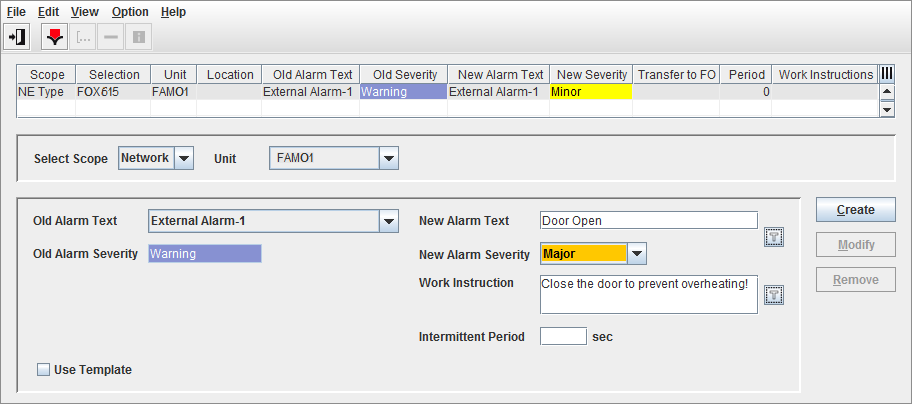
Alarm Customization - Global
The Alarm Customization templates ease the creation steps of Alarm Customization. There are 4 types of templates that the operator can create:
• Alarms & Severity,
• Work Instructions,
• Unit Alarms,
• Unit Port Alarms.
The operator can use these templates when creating customized alarms. The Unit Alarms and Unit Port Alarms templates can be used to create multiple customized alarms for a specific unit or port.