
Alarm Summary
Alarm Summary Display
The Alarm Summary gives an overall view of the alarm situation for the total network (from the NEM Desktop) or within a map (from the NEM Network Browser, or from the expanded Alarm Summary). It shows the number of currently active alarms for each severity as well as the number of cleared but not acknowledged alarms.
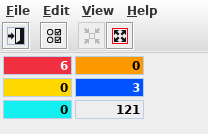
Alarm Summary, Shrunk Display
When the network elements are polled, or if notifications are received from the network elements, the operator is notified of any new alarms via the Alarm Status as follows:
• Increase of the counter for the appropriate severity;
• Blinking of the appropriate counter and colored toggle;
• Audible alarm (if enabled).
For each alarm counter the appropriate alarm list can be called with a double click of the mouse.
The alarm summary window can be shrunk or expanded. When expanded, it shows the alarm counts including the severity labels.

Alarm Summary Full