
Key authorization manager
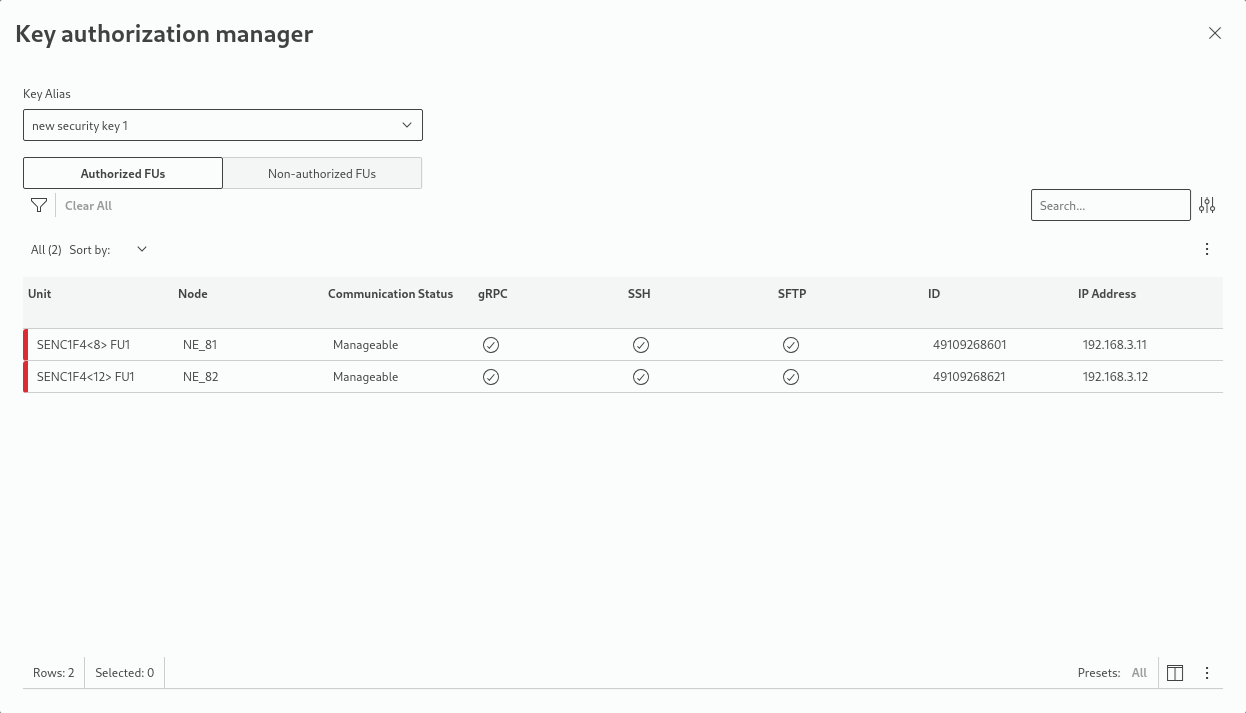
The key authorization manager lists functional units for which a selected authorization key has been assigned:
• The key of interest is selected from the “Key Alias” drop-down selection field.
• Switch between the list of “Authorized FUs” or “Non-authorized FUs” by selecting the respective field.
• The table below will list the assigned FUs with their
− Unit (physical unit identifier),
− Node (NE name),
− Communication Status (Manageable, Not manageable, Not in Dirac),
− gRPC interface (status icon),
− SSH interface (status icon),
− SFTP interface (status icon),
− ID (FU identifier),
− IP Address (if configured and known).
• In the list of Authorized FUs, authorization can be revoked for the security key currently selected in the “Key Alias” drop-down field. This is done by selecting one ore several FUs from the list and clicking on the “Revoke authorization” button.
A confirmation message will pop up when this is executed.
• In the list of Non-authorized FUs, authorization can be activated for the security key currently selected in the “Key Alias” drop-down field. This is done by selecting one ore several FUs from the list and clicking on the “Authorize” button.
A confirmation message will pop up when this is executed.