
Task Properties (legacy dialog)
Purpose
The Task Properties dialog shows the current details of a task or a sub-task. It is opened from the Task View (legacy dialog) dialog.
Dialog image
Task Properties
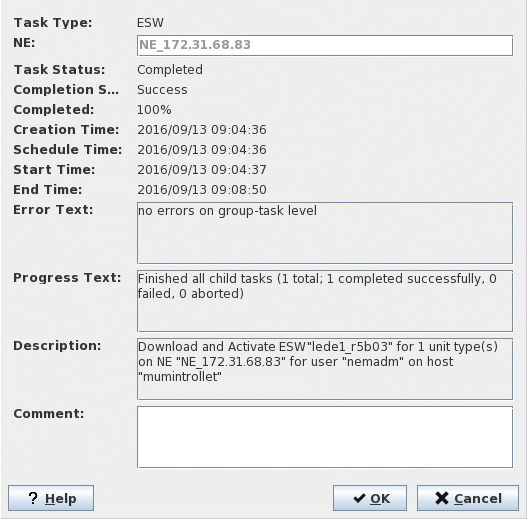
Mandatory entries
Not applicable.
Optional entries
A message can be entered in “Comment”.
Informational content
Task Type | The Task Type can be one of the following: - Profiles / CPS, - ESW, - FOX61x Service Sync, - NE Configuration restore. |
NE | Only for sub-tasks. |
Task Status | Scheduled, Completed, Aborted. |
Completion State | Not Applicable, Success, Partial Success, Failure. |
Completed | Completion ratio in percent. |
Creation Time | Date and time at which the task has been created. |
Schedule Time | Date and time to which the task has been scheduled. |
Start Time | Date and time at which the task has started. |
End Time | Date and time at which the task has ended. |
Error Text | A message that shows the most probable reason if a task has failed. |
Progress Text | A report about the progress of the task. |
Description | A descriptive message for the task. |
Comment | A message can be entered, e.g. regarding action to be taken after a failed execution. |
Controls (buttons, menu items, etc.)
? Help | Starts the FOXMAN‑UN help viewer and opens this page. |
OK | Saves modifications in “Comment” and closes the dialog. |
Cancel | Closes the dialog without saving modifications in “Comment”. |
Related dialogs / windows