
Request Inventory Report (legacy dialog)
Purpose
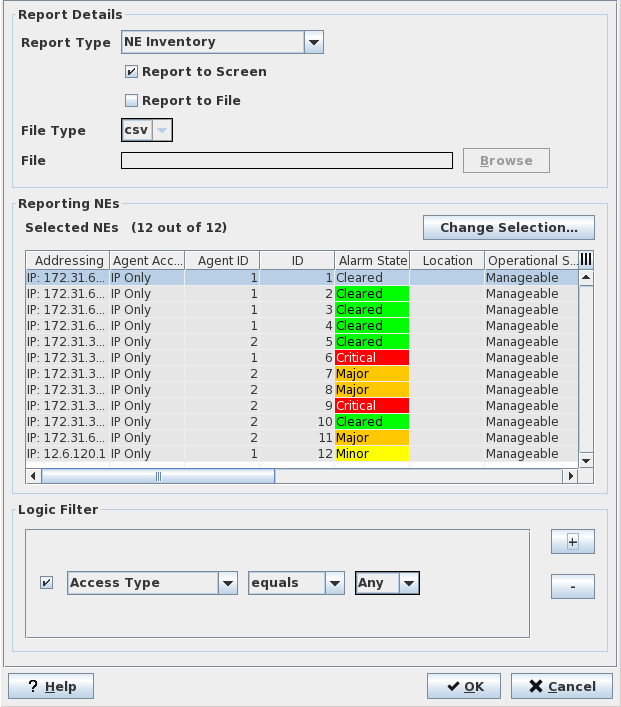
The “Request Inventory Report” is used to configure the required report. The report type and the location where the results are to be placed have to be determined. The NEs for which the report should be generated have to be selected.

Please note:
The selection of NEs list includes only the member NEs of the FOXMAN‑UN user’s assigned domain(s).
Dialog image
Inventory Reports: Request Inventory Report
Mandatory entries
Report Type | Select the required type from - NE Inventory, - Unit Inventory, - Port Inventory, - Configuration Inventory, - Service Inventory. Note: The service inventory does not provide data for FOX51x NEs. |
Change Selection | Calls the “Select NEs” dialog. |
Logical Filter
Additional fine tuning can be achieved via the “Logic Filter”. Pressing the “+” button displays a condition which can be specified. Several conditions can be sequenced. The “-” button removes the selected condition. Alternatively, the “Logic Filter” alone can be used to determine the NEs for which the report is generated
Optional entries
Not applicable.
Informational content
Selected NEs | List the NEs for which the report should be generated. |
Controls (buttons, menu items, etc.)
? Help | Calls the FOXMAN‑UN help viewer and opens this page. |
OK | Generates the report if all set parameters are valid and closes the dialog. Otherwise displays the relevant error message. |
Cancel | Closes the dialog without generating a report. The dialog “Inventory Report” remains open. From there a new request dialog can be opened via the menu “Action – Request Inventory Report”. |
Related dialogs / windows