
NE Password – Create Tasks (legacy dialog)
Purpose
This dialog allows creating a new task that will modify the password for one user class in one or several FOX61x and FOX51x NE(s).

Please note:
The list of NEs offered for selection is filtered to the member FOX61x and FOX51x NEs of the domain(s) assigned to the current FOXMAN‑UN user.
The user should have “NE Password Change Access” and “Update – Network Element” defined in its User Privileges and Profile Properties, respectively.
Dialog image
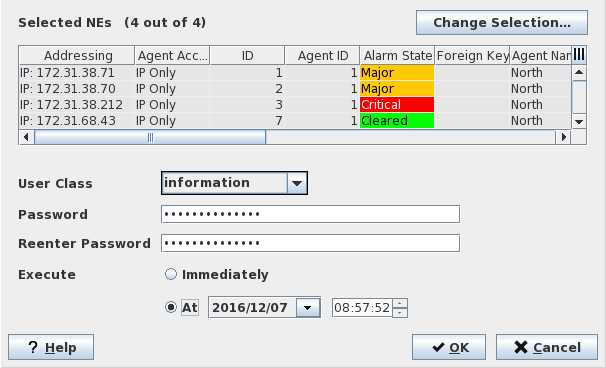
NE Password: Create Task
Mandatory entries
Change Selection | Calls the “Select NEs” dialog. At least one NE has to be selected. |
User Class | Select the user class (information, maintenance, manager, session manager) for which the password is to be modified. |
Password | Enter the new password to be applied to the selected NEs in both fields “Password” and “Reenter Password” |
Execute | Immediately: If this box is ticked, the task is started immediately after leaving the dialog via “OK”. At (a specific date and time): On opening the dialog, date and time are preset to current date and time. Clicking in the date field opens the calendar where a new date can be selected. Clicking in the hh, mm, or ss part of the time selects the hh, mm, or ss part. a new hour, minute or second can be entered, or the existing entry can be modified with the up and down arrows on the right hand side of the field, or with the up and down arrow keys of your keyboard. Triple click in the time field selects the complete field. Enter the new time using 6 digits with “:” separators. |
Optional entries
Not applicable.
Informational content
Selected NEs list the NEs whose password will be modified.
Controls (buttons, menu items, etc.)
? Help | Starts the FOXMAN‑UN help viewer and opens this page. |
OK | Creates the task and closes the dialog. |
Cancel | Closes the dialog without creating a task. |
Table Sorting and Filtering/Export and Printing
Please refer to Table Sorter section for details.
Related dialogs / windows