
Open Map
Purpose
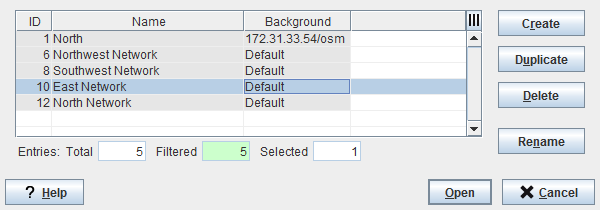
The Open Map dialog allows creating, duplicating, deleting, renaming or opening a map. Each map is identified by a unique name.
Dialog image
Open Map
Mandatory entries
Not applicable.
Optional entries
Not applicable.
Informational content
List of all existing maps with their background bitmap.
Controls (buttons, menu items, etc.)
Create | Calls the Create Map dialog. |
Delete | Deletes the selected map without confirmation. |
Duplicate | Creates a new map with identical contents as the selected map and calls the Duplicate Map Name dialog to change the map name. |
Rename | Calls the Map Rename dialog to edit the selected map’s name. |
Open | Opens the selected map and closes the dialog. Note: a newly created map automatically includes the system symbol with name of the workstation that contains the FOXMAN‑UN core. |
Cancel | Closes the dialog. |
? Help | Calls the FOXMAN‑UN help viewer and opens this page. |
Table Sorting and Filtering/Export and Printing
Please refer to Table Sorter section for details.
Related dialogs / windows
NEM Network Browser – Main Window,