
SNMP Security Profile – Create / Properties
Purpose
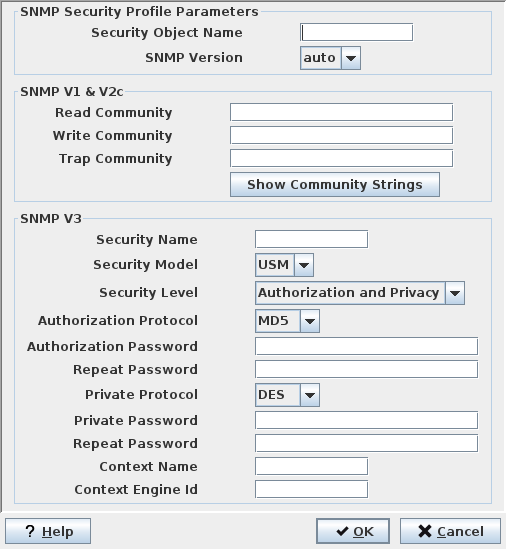
FOXMAN‑UN must be aware of the security settings in a SNMP device to be able to communicate with it. The SNMP Security Profile dialog, opened from the NEM Configurator, NE Browser tab, context menu on the “SNMP Security Profiles” tree branch, serves to set these parameters for either SNMP V1 & V2c (community strings) or for SNMP V3 (USM). A profile can then be assigned to an SNMP NE during its creation.
Entries have to be made in both sections in the case of a FOXMAN‑UN SNMP agent that has both versions of SNMP devices (v1/v2c and v3) assigned to it, or in a discovery request where both versions of SNMP devices shall be discovered.
Dialog image
Create SNMP Security Profile
Mandatory entries
SNMP Security Profile Parameters
Security Profile Name | Enter a name for the security profile. |
SNMP Version | Selectable values are V1, V2c, V3 or auto. Selection locks the setting of not applicable parameters. |
SNMP V1 & V2c
Read Community | String for read access. |
Write Community | String for write access. |
Trap Community | String for traps (if applicable). |
SNMP V3
Security Name | The security / user name. |
Security Model | Only USM is supported. |
Security Level | Selection is - “None”, - “Authorization and Privacy”, - “Authorization only”. |
Authorization Protocol | Selection is - “None”, - “MD5”, - “SHA”. |
Authorization Password | The password must be confirmed in the “Repeat Password” field. |
Private Protocol | Selection is - “None”, - “DES”. |
Private Password | The password must be confirmed in the “Repeat Password” field. |
Context Name | The context name of the sub-entity to address. |
Context Engine Id | The engine id of the sub-entity to address. Must be entered in hexadecimal form. |
Optional entries
Not applicable.
Informational content
Not applicable.
Controls (buttons, menu items, etc.)
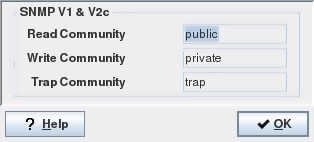
Show Community Strings | Opens the “SNMP Community Strings” window which shows the contents of the strings. In a SNMP V1 & V2c environment, these strings can be used as extended addressing. In this case it is convenient to show the contents rather than to hide them as for a full fledged password. Note: The dialog is read only. The strings must be set in the “SNMP Security Profile” dialog. The screenshot below shows the default values for the community strings. |
dialog for the SNMP community strings:
? Help | Starts the FOXMAN‑UN help viewer and opens this page. |
OK | Applies the modifications and closes the dialog. |
Cancel | Closes the dialog without applying the modifications. |
Related dialogs / windows
NE – Create / Properties dialogs.