
Create Discovery Request (Discover NEs)
Purpose
The Create Discovery Request dialog is used to set the access type (if applicable) and the address range of a discovery request and to launch the discovery process. The discovery is associated with the specific element agent that the dialog has been started from.
A discovered NE is automatically entered in the FOXMAN‑UN database with a unique default name containing time and date of the discovery. This name can be modified later in the NE – Create / Properties dialog.
Discovered NEs having an address that already exists in the database are ignored. Also NEs that cannot be put under control because their settings do not match the requirements of successful FOXMAN‑UN-NE communication are removed after discovery.
The Discovery Request may be canceled by calling the context menu of the element agent the discovery has been launched from and selecting Cancel NE discovery request
Dialog image
The contents of the dialog depend on the type of agent. The image below shows the dialog for agent of the type FOX61x.

Please note:
For FOX51x agent, depending on the agent’s selection in Access Type, either IP Addressing or HDLC Addressing / HDLC Routing will be accessible.
Create Discovery Request on Agent: <Agent_name>
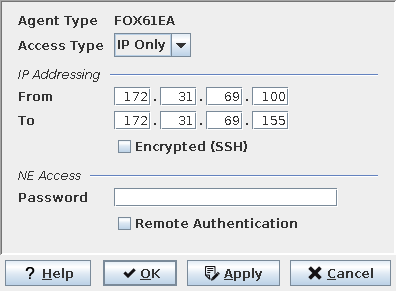
Mandatory entries
Access Type
Applicable for “Agent Type” FOX51x only:
Access Type | IP only for FOX515, FOX512. HDLC only for FOX-U, FOX-U/M, COLT2. |
IP Addressing
“From” and “To” | A discovery can only be performed for the last section of the IP address. The first 3 sections must be identical. |
Encrypted (SSH) | Use a secure (SSH) connection to the NEs. Not available for all NE types. |
HDLC Routing
Applicable for “Agent Type” FOX51x and “Access Type” HDLC only:
“From” and “To” | HDLC address range is from 1 to 254. |
IP Address: | The IP address of the terminal server or the gateway Network Element through which the NEs of the type FOX-U, FOX-U/M or COLT2 can be reached. |
Port: | The TCP port number of the relevant interface in the terminal server or of the Q1 master interface in the gateway Network Element. |
Settings
Applicable for SNMP devices only:
See under NE – Create / Properties for details.
NE Access
Applicable for FOX61x and FOX515/FOX512 NEs:
Password | Only NEs with a configuration containing the password entered here will be discovered. This is valid also for an empty password (no password). |
Applicable for SNMP devices only:
SNMP Security (SNMP devices) | Only SNMP devices with security settings matching the entries in the selected profile will be discovered. |
Applicable for FOX61x NEs only:
Remote Authentication | Enables FOXMAN‑UN to discover NEs that only have RADIUS Authentication enabled. |
Optional entries
Not applicable.
Informational content
Not applicable.
Controls (buttons, menu items, etc.)
SNMP Security | See above under “NE Access” for SNMP devices. |
? Help | Starts the FOXMAN‑UN help viewer and opens this page. |
OK | Applies the modifications and closes the dialog. |
Apply | Applies the modifications without closing the dialog. |
Cancel | Closes the dialog without applying the modifications. |
Related dialogs / windows
Not applicable.