
Alarm Escalation
Purpose
This section includes FOXMAN‑UN’s special handling of alarms that include delayed creation, external indication via horn-box, and sending alarm notifications via email. The Alarm Escalation (AE) parameters, including the timers T1, T2, and T3, are configurable via the “$NEM_HOME/etc/alarming.conf” file. For more details also refer to the user manual [1KHW002414] FOXMAN‑UN under Linux.
The FOXMAN‑UN user (with Global Config Access user privilege) can activate/deactivate these functions via the NEM Configurator menu “Edit – Options”
The time chart below provides an overview of the alarm escalation concept (It is assumed that all AE functionalities are enabled):
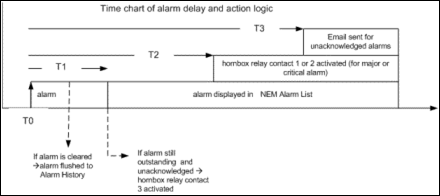
The alarming.conf timer delay values indicate the number of seconds to delay from the occurrence of the alarm (T0). The default values are as follows:
− T1 (Alarm Activation Delay): 180 secs (3 minutes) from T0. Indicate the number of seconds to delay before activating all alarms.
− T2 (Horn-box Indications Delay): 360 secs (6 minutes) from T0. The number of seconds to delay before turning on horn-box indications.
− T3 (Email Notification Delay): 540 secs (9 minutes) from T0. The number of seconds to delay before sending emails.
The timers (T1, T2, and T3) start when an incoming alarm is detected.
Alarms raised and cleared before T1 time is elapsed will be flushed immediately to Alarm History. Alarms will be logged and displayed into Alarm List only after the T1 time is elapsed.
If the alarm is still outstanding (active) and unacknowledged at the end of T1, the FOXMAN‑UN will activate the relay contact 3 of the horn-box. It will remain activated until the last unacknowledged alarm is acknowledged.
If the outstanding alarm is major or critical, FOXMAN‑UN will activate the relay contact 1 or 2 of the horn-box when the T2 is elapsed.
− Relay contact 1 is activated for major alarms. It will remain activated until last major alarm is acknowledged.
− Relay contact 2 is activated for critical alarms. It will remain activated until the last critical alarm is acknowledged.
When T3 is elapsed, and the parameter “alarm_auto_acknowledge” is “off” (defined in alarming.conf), and you haven’t manually acknowledged the alarm(s), FOXMAN‑UN will forward an email to the specified email address (as defined in the alarming.conf) listing the unacknowledged outstanding alarms.

Please note:
• Only one horn-box per FOXMAN‑UN is supported.
• Only the Outputs are used to connect a lamp:
• +24Vdc : Pin 1/16
• GND : Pin 2/15
• Major Alarms : Pin 3
• Critical Alarms : Pin 4
• Alarm Warning after T1 : Pin 5
Dialog image
Options
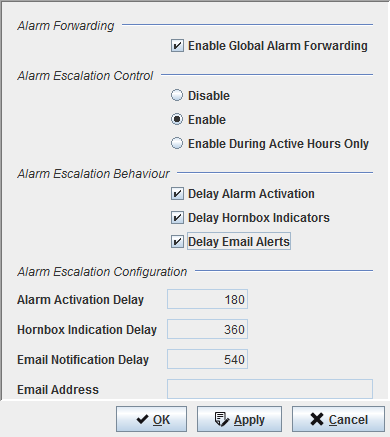
Controls (buttons, menu items, etc.)
Alarm Forwarding
Enable Global Alarm Forwarding | Enable/Disable Global Alarm Forwarding functionality. Refer to section Alarm Forwarding for details. |
Alarm Escalation: Control
Disable | Disables the Alarm Escalation handling. |
Enable | Activates the Alarm Escalation handling. |
Enable during Active Hours only | Alarm Escalation handling is NOT activated during the time period as specified in the “Inactive Times” entries of the alarming.conf. |
Alarm Escalation: Behavior
Delay Alarm Activation | Enable/Disable Alarm Activation Delay. If this is enabled, the incoming alarm(s) will be logged and displayed in the Alarm List only after the T1 time is elapsed. |
Hornbox Indicators | Enable/Disable Hornbox Indicators. If this is enabled, FOXMAN‑UN will activate the relay contact 1 or 2 of the hornbox when the T2 is elapsed (provided that any of the major or critical outstanding alarms is unacknowledged). The relay(s) will remain activated until the last major/critical alarm is acknowledged. |
Email Alerts | Enable/Disable email forwarding for unacknowledged alarms after T3 is elapsed. Note: Only one email address can be supported per FOXMAN‑UN. |
Alarm Escalation Configuration
Shows the Alarm Escalation (AE) parameters’ currently configured values in the “$NEM_HOME/etc/alarming.conf” file. For details, please refer to the time chart explained at the beginning of this section. | |
Alarm Activation Delay | Indicate the number of seconds to delay before activating all alarms. |
Hornbox Indication Delay | The number of seconds to delay before turning on hornbox indications |
Email Notification Delay | The number of seconds to delay before sending emails. |
Email Address | The configured email address where to send the notification emails. |
Controls (buttons, menu items, etc.)
OK | Applies the modifications and closes the dialog. |
Apply | Applies the modifications without closing the dialog. |
Cancel | Closes the dialog without applying the modifications. |