
Alarm Customisation – Create Template
Purpose
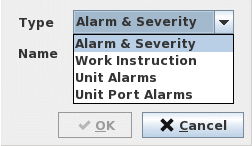
The Create Template dialog allows the creation of any of the four Alarm Customisation template types as listed below:
− Alarm & Severity,
− Work Instructions,
− Unit Alarms,
− Unit Port Alarms.
The newly created template(s) will be added to the Manage Template Table.
Dialog image
Create Template
Mandatory entries
Type
Allows you to select one of the four types of Alarm Customisation Templates:
Alarm & Severity | Creates Alarm & Severity type template. |
Work Instructions | Creates Work Instructions type template. |
Unit Alarms | Creates Unit Alarms type template. |
Unit Port Alarms | Creates a Unit Port Alarms type template. |
Name
Specifies a name for the new template.
Unit
Applicable to Unit Alarms and Unit Port Alarms type templates.
Specifies a specific NE Unit to which the template is to be applied.
Controls (buttons, menu items, etc.)
Buttons
OK | Creates/ adds the new template type to the Manage Template Table and closes the dialog. |
Cancel | Closes the dialog without creating the template. |