
The Routing process
The FOXMAN-UN NP will search for all possible hops having enough connectable capacity at the 'a End TP'. It is possible to select any proposed hop and continue routing towards end point Z until the Circuit routing has been completed (i.e. a complete Path between 'a End TP' and 'z End TP' has been configured).
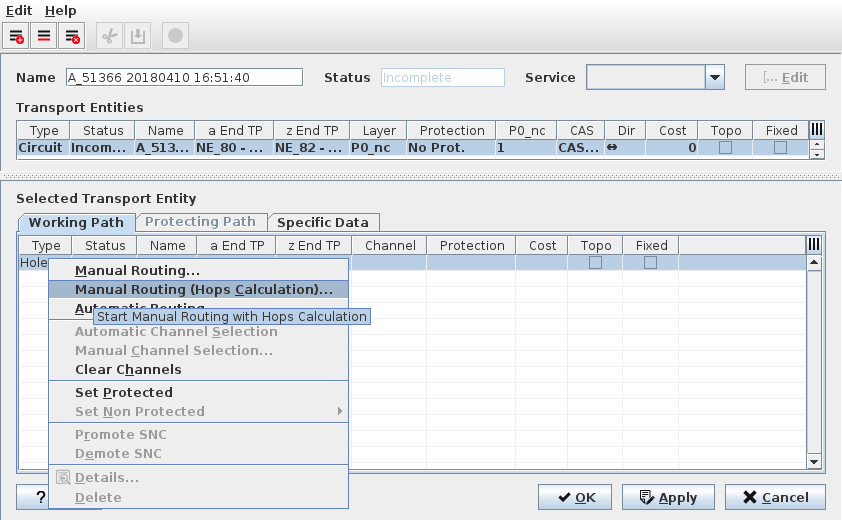
The Incomplete Path
To start the manual Routing process, select the Working Path entry «Hole» and open the context menu with the right mouse button.
Manual Routing | Calls the Manual Routing: Next Hop List dialog shown to search for all possible hops having enough capacity for the service to be routed. The user can select one of these hops. NP search then for all possible hops from the selected hop. |
Manual Routing (Hops Calculation) | Calls the Manual Routing: Next Hop List dialog shown on The possible hops with indications to reach the Endpoints to search for all possible hops having enough capacity for the service to be routed with the additional indication of minimum number of hops to reach the final. The user can select one of these hops. The NP search then for all possible hops from the selected hop. |
Automatic Routing | Enables the route completion in one operation based on the values specified in the Set Automatic Routing Parameters dialog. Note: When an NP user initiates an Auto Route request, a Cancel dialog shall appear to allow the user to terminate the request. |
Automatic Channel Selection | Selects a channel automatically. Note: Once routed, the Circuit knows on which hops the End-to-End signals are multiplexed. The next step is to select a dedicated TS in all Trails of the Path. |
If the Manual Routing (Hop Calculation) is selected, the FOXMAN-UN NP shows in the Final field the remaining hops till Z point is reached.
The list below allows you to select any proposed hop to reach the Endpoints.
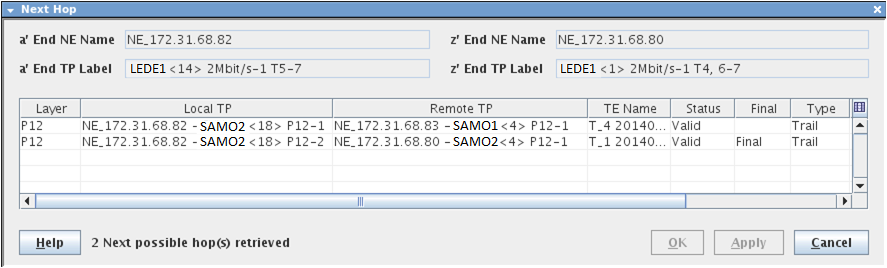
The possible hops with indications to reach the Endpoints
OK | Applies the modifications and closes the dialog. |
Apply | Allows the selection of next possible hop till the selected Trail reaches the Endpoint. |
Cancel | Closes the dialog without making any changes. |