
Concept
The SW programs are using so called “loggers” (utilities) to output formatted program internal information & status information to the console.
The log output is printed to the console standard output (stdout) and to the console error output (stderr). For processes managed by systemd the console output is forward to the Linux system logging utility (rsyslogd).
As a minimal requirement the log message generated by the processes should contain date and time, host address, log level (ERROR, INFO, DEBUG etc.), and service (process) name of which is generating this log message. The rest of the information is formatted according to the SW development (testing, debugging) needs.
Example of a log message:
Aug 10 11:53:33 chbrn3-v-dev007 nem-bp-networkmgr [558137]: 34795 - 08/10/2021 11:53:33.491 - [139719310325504]
ERROR feature.nem.rest.client.558137 application credentials couldn't be read; falling back to default values [nemrestclient.cpp:365]
The loggers can be set up to output specific information (feature loggers) or basic information (default loggers).
A special case is the tracing facility where all possible logging information is output directly to the file system.
Loggers can be activated / updated without the need to restart the daemon / application.
For the daemons on the Linux operating system the systemd is processing the console output and forward them to the journald and to the rsyslogd.
The rsyslogd will parse received messages and forward it to the log files (/var/log/nem).
The following figure outlines the path a log message will take and where the message is stored in the file system.
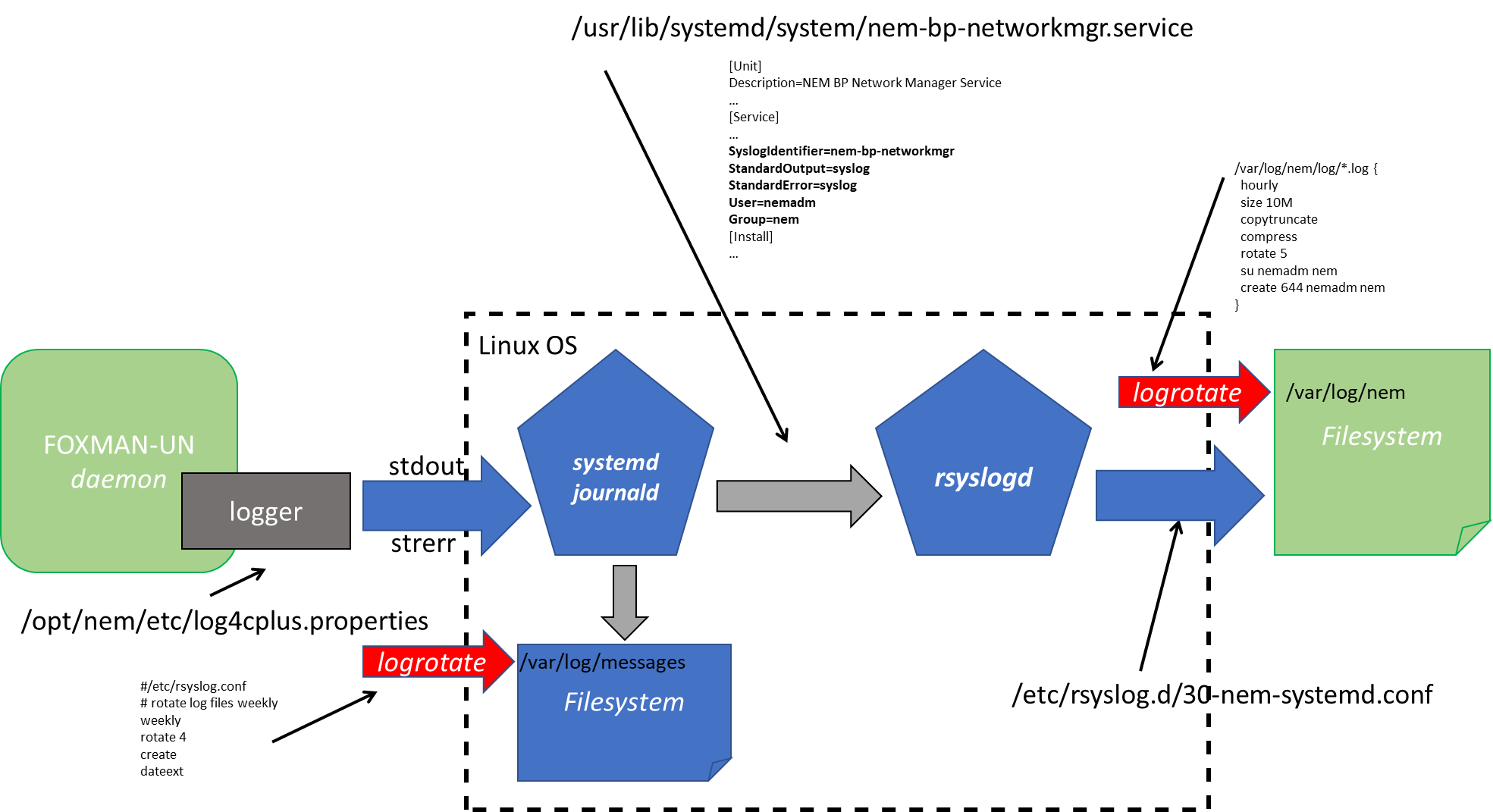
Log message path
The references to the system configuration are only indicative and may change between releases.

Please note:
The logrotate will limit the amount of free disk space required for the journal (max 4 weeks of journal data) and for the FOXMAN-UN log files (size and time limited).