
Possible External Communication (including Remote Access)
As discussed above, our Product operates in isolation, almost exclusively without any connection to an external system. Modems being used until a few years ago are now replaced by solutions using the Internet. Most companies have their established security rules and established remote access solutions to access the Internal Corporate Network from the Internet; therefore, the implementation of a remote access requires close cooperation with the customer.
Below three types of remote access are discussed which are examples for possible implementation only. Other possible solutions are available but are within the responsibility of the customer.
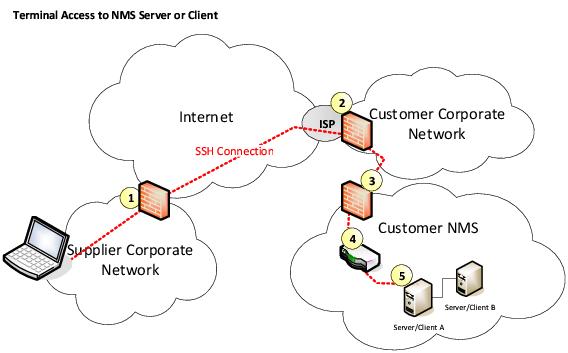
Remote Terminal Access using SSH through Customer Corporate Network Firewall
The remote access using the SSH protocol provides access to a character based terminal port on the target system, e.g. the NMS Server. To access the graphic console, it is possible to use one additional TCP channel embedded in the SSH protocol. This channel can be used to interconnect one additional program pair on both ends of the link. This program pair typically provides access to the graphical console using Client/Server based solutions such as X11 or VNC. The interconnected Computers can in addition exchange files using the SFTP protocol.
This solution requires one in-bound port (default port number is 22) to be opened at firewall 2 and 3. Device 4 is a switch or can represent the internal layer 2 infrastructure consisting of a hierarchy of switches. Allowed traffic should be restricted to start at a specific IP or IP range, e.g. from the Hitachi Energy Corporate Network, and terminate at the target machine only. As it is impractical to enable and disable the configurations of the firewalls per each individual remote access, firewalls will be set-up once and remain. However, as an additional security measure the customer can switch on and off the Ethernet Connection at point 4. This will allow the customer to control the remote access to the NMS and corresponds to switching on and off the modem in the earlier solutions.
The next picture shows an Hitachi Energy solution for the provision of a secure remote access through a mobile provider’s network via the Internet to an Hitachi Energy server. The small access box takes care of running the SSH protocol and includes a firewall and other security features. The advantage of this solution, it is secure and very easy to use. No access to the Internet through the customer corporate network is required and no configuration is required on the customers NMS client computer. The only requirement is a free LAN interface on the target computer and access to a wireless 3G/4G/5G network.
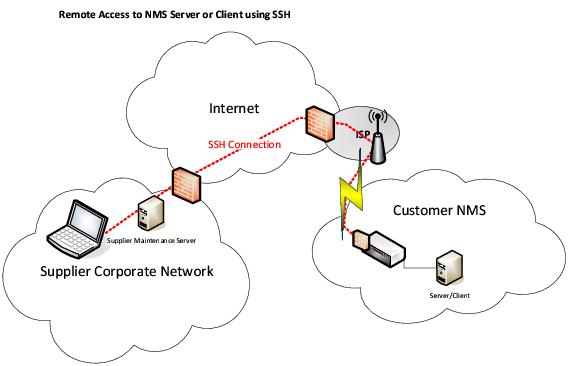
Remote Access using SSH secured through dedicated hardware (access box)
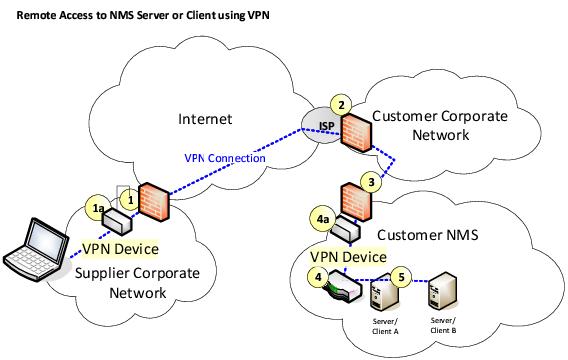
Remote access using VPN
This solution is similar to a solution using SSH in the way that it also requires opening a TCP port in the firewalls. Several VPN protocols can be used e.g. OpenVPN and IPsec. The VPN software can run on a dedicated hardware or directly on the communicating devices. The protocol supports authentication and encryption. The difference to the first solution is that access is granted not to a specific computer but to a remote IP network, e.g. the NMS Interconnection LAN. The remote computer could therefore install NMS Client software and be used as an NMS operator workplace. Again, remote access could be switched on and off at point 4 – a specific port of a switch belonging to the NMS Interconnection Network.
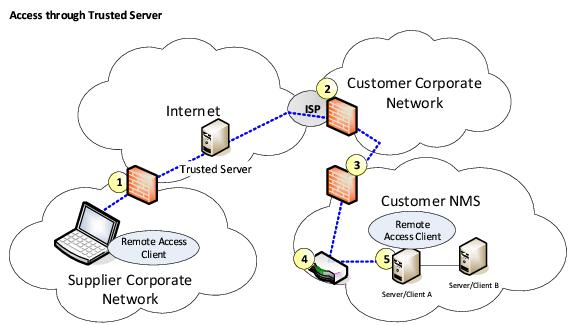
Access through Trusted Server
To establish a remote connection each side needs connecting to a special server. This server then joins the two sides. There are specialized companies offering such servers. This solution allows taking over the screen, keyboard, and mouse of a remote computer and supports the upload and download of files.
The advantage is that connections must be initiated from the target computer, i.e. the customer, who is in full control of the access and can watch the screen while the remote supporter works on his system. Another advantage is that it is not required to open an incoming TCP port in the customers firewall. A standard outgoing HTTP port is all that is required. The firewall at point 3 will block all incoming traffic to the customer NMS. A common solution is to connect a dedicated LAN port to the company’s Corporate Network and use the firewall from the Server Operating System to block incoming traffic. In case of a need for remote access the operator will enable this dedicated LAN port; otherwise it stays disabled.