
Configure PAM for RADIUS authentication module on FOXMAN-UN server
The following preconditions need to be satisfied:
• FOXMAN-UN is correctly installed and configured on RedHat 9.6 (64 bit).
• FreeRADIUS server is installed and configured on Linux server.
• Spare 64 bit Linux machine is installed and configured.
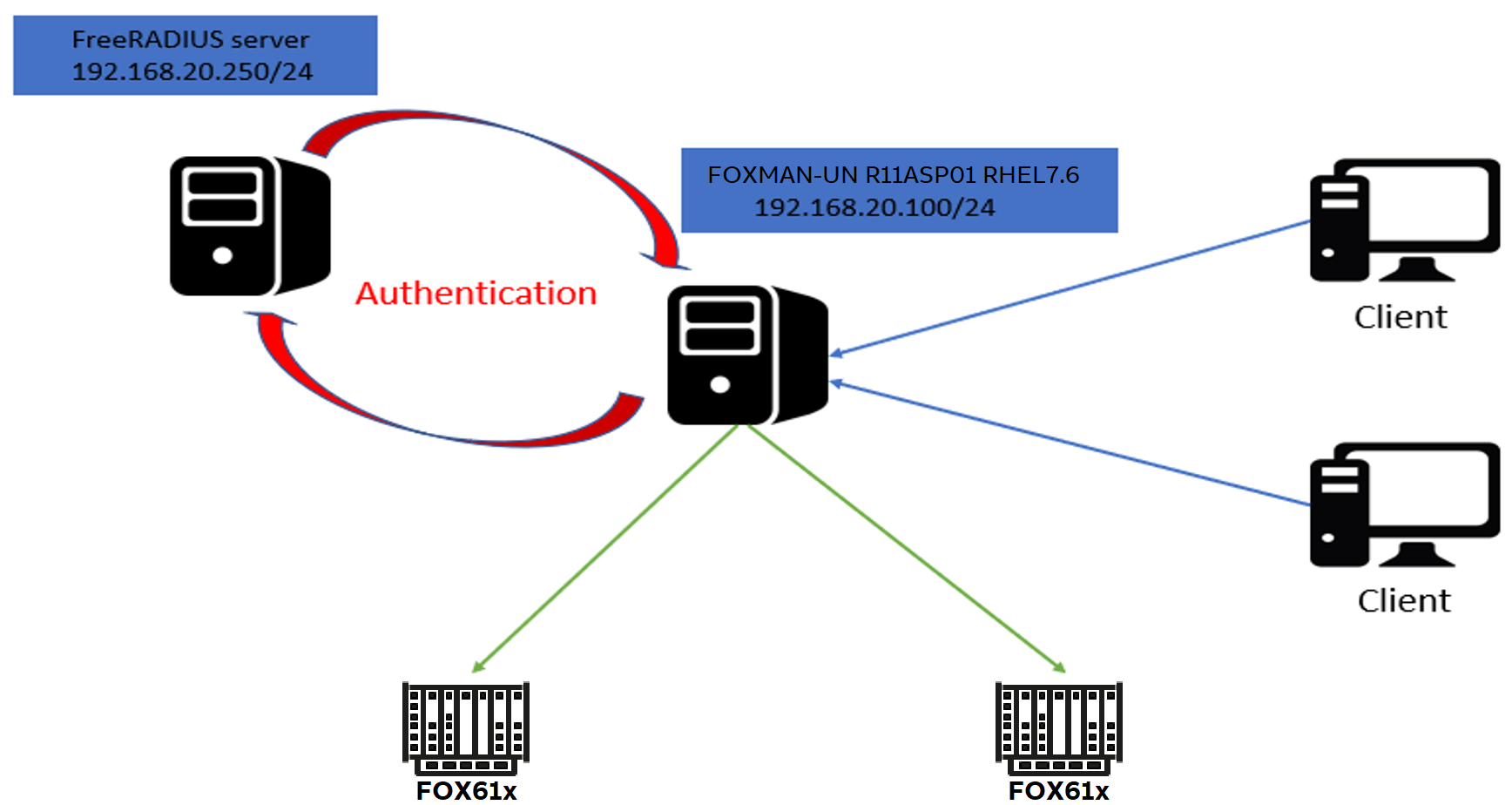
Basic setup (example)
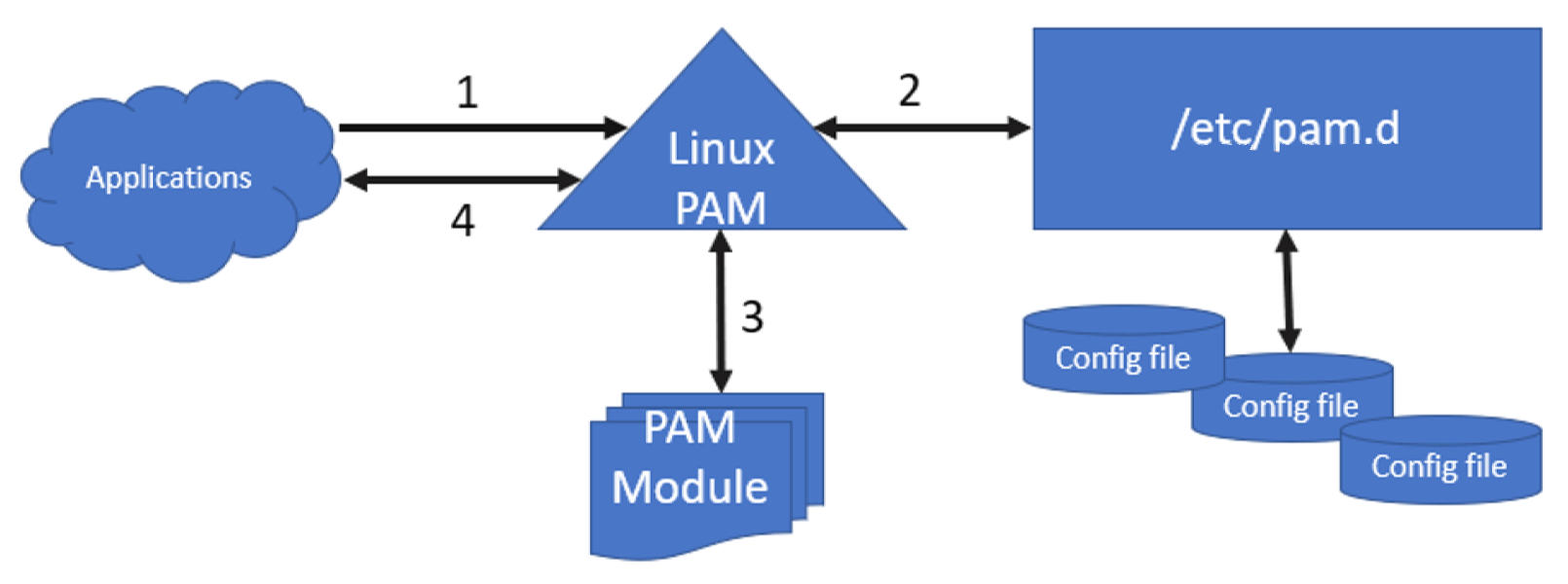
Relations of modules
The FreeRADIUS PAM software for client authentication is available at
https://freeradius.org/sub_projects/

Download of pam_radius-release_3_0_0.tar.gz
Since FOXMAN-UN R18 is a 64-bit application installation the additional PAM shared library is required at 64 bit for full support of user authentication.
To compile the PAM module in the correct way it is better to use a spare 64 bit Linux environment with the required software gcc and pam-devel at 64 bit installed.
Installation and setup instruction
Proceed as follows:
1. Install additional software gcc and pam-devel for library configuration on spare 64 bit Linux server.
• mount the DVD or the ISO image of your Linux 64-bit OS as Local Repository and enable the repository as per Linux 64-bit OS System Administration manual.
• as root:
#yum install gcc pam-devel
Dependencies resolved.
==================================================================================
Package Architecture Version
==================================================================================
Installing:
gcc x86_64 gcc-11.5.0-5.el9_5
pam devel x86_64 pam-devel-1.5.1-22.el9_5
Installing for dependencies:
cpp x86_64 cpp-11.5.0-5.el9_5
glibc-devel x86_64 glibc-devel-2.34-125.el9_5
glibc-headers x86_64 glibc-headers-2.34-125.el9_5
kernel-headers x86_64 kernel-headers-5.14.0-503.33.1.el9_5
libasan x86_64 libasan-11.5.0-5.el9_5
libatomic x86_64 libatomic-11.5.0-5.el9_5
Transaction Summary
==================================================================================
Install 2 Packages (+6 Dependent packages)
Total download size: 39 M
Installed size: 55M
2. Transfer the pam_radius-release_3_0_0.tar.gz to the /opt folder on spare 64-bit Linux server.
3. Create the 64-bit shared library for PAM authentication
• as root:
Extract the files
Extract the files
#tar -zxvf pam_radius-release_3_0_0.tar.gz
• Configure the library
#cd /opt/pam_radius-release_3_0_0
#./configure
checking build system type... x86_64-unknown-linux-gnu
checking host system type... x86_64-unknown-linux-gnu
checking target system type... x86_64-unknown-linux-gnu
checking for gcc... gcc
checking whether the C compiler works... yes
checking for C compiler default output file name... a.out
checking for suffix of executables...
checking whether we are cross compiling... no
checking for suffix of object files... o
checking whether we are using the GNU C compiler... yes
checking whether gcc accepts -g... yes
checking for gcc option to accept ISO C89... none needed
[...]
checking for the compiler flag “-Wdocumentation”... no
checking if building with -DNDEBUG... no
configure: creating ./config.status
config.status: creating src/config.h
#make
cc -Wall -fPIC -c src/pam_radius_auth.c -o pam_radius_auth.o
src/pam_radius_auth.c: In function ‘pam_private_session’:
src/pam_radius_auth.c:1300:6: warning: variable ‘ctrl’ set but not used [-Wunused-but-set-variable]
int ctrl;
^
cc -Wall -fPIC -c src/md5.c -o md5.o
cc -shared pam_radius_auth.o md5.o -lpam -o pam_radius_auth.so
→ The procedure generates under the directory /opt/pam_radius-release_3_0_0 the shared library pam_radius_auth.so compiled at 64-bit.
4. As root, transfer the ‘pam_radius_auth.so’ to the FOXMAN-UN server on /lib64/security/ path
verify ownership: root:root
and permit: 755
5. As root, configure the required modules per application in /etc/pam.d/ on FOXMAN-UN server by adding the following line to the required applications file:
auth [success=done auth_err=die default=ignore] pam_radius_auth.so
auth include system-auth
• Note:
This configuration allows the login even if RADIUS server is note reachable or RADIUS service is down; the primary authentication is via RADIUS and alternative is system-auth.
This configuration allows the login even if RADIUS server is note reachable or RADIUS service is down; the primary authentication is via RADIUS and alternative is system-auth.
• For FOXMAN-UN application
nem-auth
Make a backup copy:
#cp /etc/pam.d/nem-auth /etc/pam.d/original_nem-auth
• Edit the files and save the configuration:
#vim /etc/pam.d/nem-auth
#%PAM-1.1
#NEM authentication
auth [success=done auth_err=die default=ignore] pam_radius_auth.so
auth include system-auth
auth required pam_nologin.so
account required pam_unix.so
password include system-auth
session include system-auth
session required pam_limits.so
session optional pam_console.so
• Restart the application to load the new configuration:
as a NEM administrator, execute:
#nemstop
#nemstart
6. Create the server configuration file for the RADIUS server connection.
• As root, create the FreeRADIUS configuration directory under /etc
#mkdir /etc/raddb/
• use the file under /opt/pam_radius-release_3_0_0/pam_radius_auth.conf as a template and copy to /etc/raddb with server name.
#cp pam_radius_auth.conf /etc/raddb/server
#chmod go-rwx /etc/raddb/server
7. As root, configure the Radius Server to provide the authentication service to the FOXMAN-UN server. According to your FreeRADIUS server setup, users and clients can be defined on database or files. In this procedure it has been defined on file basis:
• Two files need to be configured:
For RHEL:
/etc/raddb/clients.conf
/etc/raddb/users
as an example, based on figure 1, the FreeRADIUS server is 192.168.20.250 and FOXMAN-UN server is 192.168.20.100.
• Append in the client.conf the following section where secret is the secret key that server and client use for the FreeRADIUS Authentication. The client IP is the FOXMAN-UN IP, the short name is a description, you can use the FOXMAN-UN hostname. Example:
#vim /etc/raddb/clients.conf
client 192.168.20.100/24 {
secret = testing123
shortname = FOXMAN-UNR18
nastype = other
require_message_authenticator = no
}
• Put at the beginning of the users file, before any comment line, the FOXMAN-UN’s users that need to authenticate by FreeRADIUS server. In a basic installation, these are nemadm for FOXMAN-UN application and root for the server administration. Example:
#vim /etc/raddb/users
nemadm Cleartext-Password := “nemadm”
root Cleartext-Password := “TrA%18gz”
#
# Configuration file for the rlm_files module.
# Please see rlm_files(5) manpage for more information.
#
8. As root, configure the FOXMAN-UN server to connect to the FreeRADIUS server.
• Edit the /etc/raddb/server file and add a line with the IP address of FreeRADIUS server and the secret key as configured in client.conf file above) for the FOXMAN-UN server.
- As example from Basic setup (example):
# vim /etc/raddb/server
# server[:port] shared_secret timeout (s)
192.168.20.250 testing123 3
Result: You have successfully set up the PAM modules.
End of instruction