
Creating new Entries in crosslaunch.properties
If you need to create new entries or modify entries in the «crosslaunch.properties» file for SNMP equipment, you build these entries as follows:
#! There are no Spaces allowed !
%D = Designation which appears in the GUI
%S = Script or program path which will be launched
%O = Additional argument which will be passed to %S
%A Will be replaced with the IP Address
%N Will be replaced with the NE Name
%L Will be replaced with the NE Location
%I Will be replaced with the NE Identity (NE id)
%K Will be replaced with the FO Key (only for FOs; empty for NEs)
%U Will be replaced with the User Name (read from additional info)
%P Will be replaced with the Password (read from additional info)
%G Will be replaced with the Logged User
%H Will be replaced with the FOXMAN-UN Home (read from env var)
Sample entries can be found for all currently known EDS500 devices in the files «/opt/nem/client/etc/crosslaunch.properties» and «/opt/nem/etc/crosslaunch.properties» as follows:
500NMD01 %D=WebInterface;%S=/usr/bin/firefox;%O=http://%U:%P@%A
500NMD02 %D=WebInterface;%S=/usr/bin/firefox;%O=http://%U:%P@%A
500NMD11 %D=WebInterface;%S=/usr/bin/firefox;%O=http://%U:%P@%A
500NMD20 %D=WebInterface;%S=/usr/bin/firefox;%O=http://%U:%P@%A
500NMD30 %D=WebInterface;%S=/usr/bin/firefox;%O=http://%U:%P@%A
500NMD40 %D=WebInterface;%S=/usr/bin/firefox;%O=http://%U:%P@%A
500NMD41 %D=WebInterface;%S=/usr/bin/firefox;%O=http://%U:%P@%A
500NMD42 %D=WebInterface;%S=/usr/bin/firefox;%O=http://%U:%P@%A
500NMD43 %D=WebInterface;%S=/usr/bin/firefox;%O=http://%U:%P@%A
500NMD44 %D=WebInterface;%S=/usr/bin/firefox;%O=http://%U:%P@%A
...
500NMD69_R0002_R0003 %D=WebInterface;%S=/usr/bin/firefox;%O=http://%U:%P@%A
The same sample entries for all currently known EDS500 devices for the NEM GUI running on Windows can be found in the file «C:\Program Files\FOXMAN-UI_R18\etc\crosslaunch.properties» (or similar, depending on installation path) as follows:
500NMD01 %D=WebInterface;%S=c:/Program Files (x86)/Mozilla Firefox/firefox.exe;%O="http://%U:%P@%A"
...
500NMD69_R0002_R0003 %D=WebInterface;%S=c:/Program Files (x86)/Mozilla Firefox/firefox.exe;%O="http://%U:%P@%A"

Please note:
Under Windows, the crosslaunch.properties entry for starting the web browser calls the explorer.exe application, which opens the currently configured default web browser since argument %0 contains an http:// address.
Under Windows, when the path to the application (i.e. the path for the argument %S) contains a space, the space has to be delimited by a «backslash-space», i.e. «\ ».
Example for Edge Browser:
500NMD01 %D=WebInterface;%S=C:\Program\ Files\ (x86)\Microsoft\Edge\
Application\msedge.exe;%O=http://%U:%P@%A
Application\msedge.exe;%O=http://%U:%P@%A
Example for Chrome Browser:
500NMD01 %D=WebInterface;%S=C:\Program\ Files\Google\Chrome\Application\
chrome.exe;%O=http://%U:%P@%A
chrome.exe;%O=http://%U:%P@%A
To launch the UI of an EDS500 device, use the context menu of the device and click on “Activate WebInterface”:
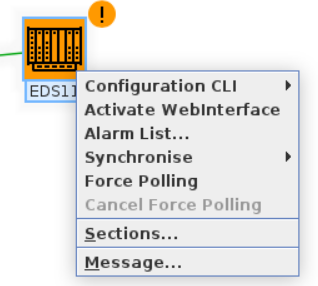
NE Menu: Activate WebInterface
A sample Web UI of an EDS500 device may look as follows:
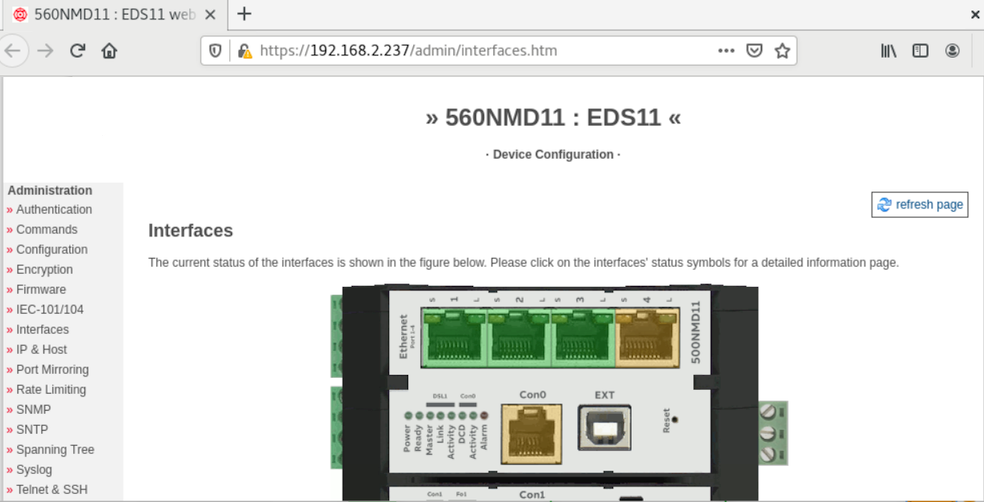
Sample EDS500 Web UI