
Teleprotection Service Removal
Any created Teleprotection Service can be removed. Proceed as follows:
• Navigate to the Teleprotection Services tab:

• Select service to be removed in the table. It will be highlighted in the map. Optionally many services can be removed at once. To do that select several Teleprotection services in the table.
• Use the action menu with the three dots symbol - or the context menu - and trigger the Delete action:
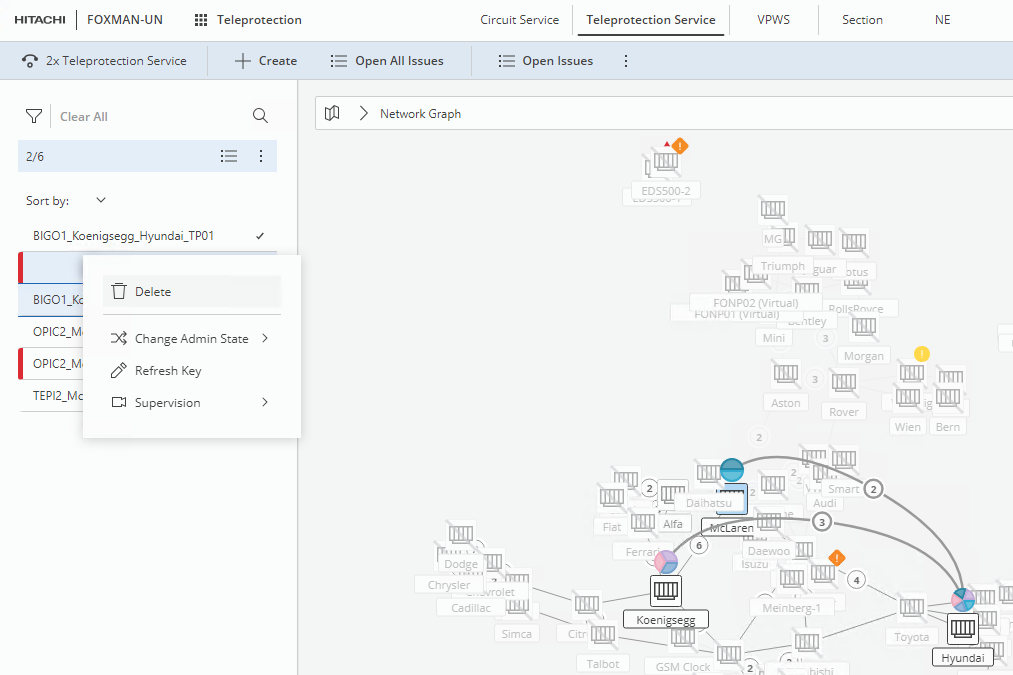
• Confirm the service deletion, or cancel. Optionally you can choose whether or not to also delete the underlying transport service(s), i.e. the VPWS being used by the service(s).
• If confirmed, this will delete the service from the table and from the network. By default, transport service(s) will be removed.
• Expected result:
A success message should be visible in the right bottom corner of the application view.
After some processing time the removed services should no more be visible in the Teleprotection Services table and in the map.