
Restore Configuration
Purpose
FOXMAN‑UN creates a configuration history of configurable length (maximum 10, default 5, defined in the “tasks.conf” file) for each FOX61x and FOX51x NE.
At a configurable time offset after midnight (default at 01:00 FOXMAN‑UN server local time, defined in the “tasks.conf” file), the current configuration is compared with the most recent one recorded in the history. It is added to the history if it was modified.
The “Restore Configuration” dialog is called from the context menu of an NE in the NEM Network Browser or the NEM Configurator. It shows the recorded configuration history. For a newly created NE, the history list will initially be empty.
Any configuration in the list can be selected and downloaded to the NE, provided the user has the appropriate access rights.
Dialog image
Restore Configuration: <NE_name>
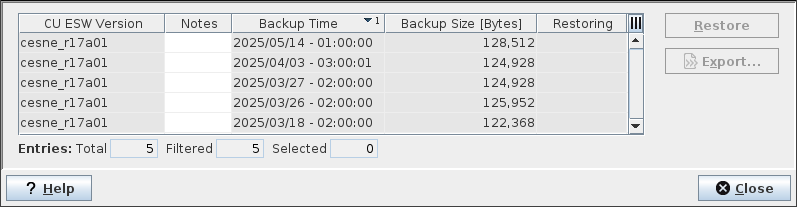
Mandatory entries
Not applicable.
Optional entries
Not applicable.
Informational content
List of recorded NE configurations for the selected NE with
• CU ESW Version (Core Unit NE ESW, for FOX61x NEs only),
• Notes (optional),
• Backup Time (Date and Time),
• Backup Size [Bytes],
• Restoring (showing restoring status),
• Configuration ID (hidden by default).
Controls (buttons, menu items, etc.)
Menus
Restore | Restores the selected configuration backup file to the NE. For FOX61x NEs, before restoring, the backend verifies whether there is a matching Core Unit ESW (main version must match) available on the NE. For FOX61x NEs, the configuration backup is only restored if the version of the Core Unit ESW in the backup matches the Core Unit ESW running or at least downloaded on the NE. Note: - If there is no match, the user must choose whether to abort the restore process or to continue with the risk that the NE will get unavailable due to incompatibility of ESW available on the node and ESW configured in the backup. If there is no match and the restore process is aborted, the configuration backup can be exported and then compared with the running configuration on the NE using the FOXCST. |
Export… | Export the selected NE configuration backup from the NEM database to a file. Opens a dialog to select a folder to store the NE configuration backup file. The default filename includes the NE name and the current date and time. The filename can be modified before applying. The filename extension must remain “.tar”. |
? Help | Starts the FOXMAN‑UN help viewer and opens this page. |
Close | Closes the dialog without applying the modifications. |