
Map Options
Purpose
This dialog allows:
− setting the map background opacity
− indicating the total section capacity in line thickness
− setting the initial horizontal and vertical spacings or distances (in pixels) between nodes as well as the maximum number of nodes per row.

Please note:
This feature is available in Edit mode when adding NEs/FOs in a map.
Dialog image
Options
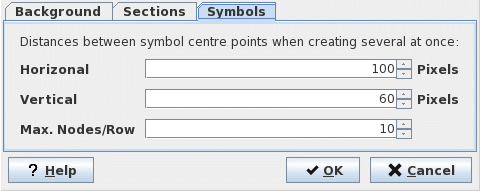
Mandatory entries
Not applicable. You can retain the default values.
Optional entries
Not applicable.
Informational content
Not applicable.
Controls (buttons, menu items, etc.)
Background
Opacity of the map background in percent | Select the opacity of the map background in percent. The selectable range is 0%…100%. Changes can be verified while moving the marker. Note: 0% opacity hides the background image |
Width of background shade-out in pixel | Set the width of the shade-out area around symbols on the map. The selectable range is 0…20 pixels. Changes can be verified while moving the marker. |
Sections
Show Capacity | Select the checkbox to indicate the total section capacity in line thickness |
Symbol
Horizontal Gap | Defines the initial horizontal distance (in pixels) between nodes. |
Vertical Gap | Defines the initial vertical distance (in pixels) between nodes. |
Max. Nodes/ Row | Defines the initial maximum number of nodes per row. |
? Help | Calls the NEM Help Viewer |
OK | Applies the selection and closes the dialog |
Cancel | Closes the dialog without applying the selection. |
Related dialogs / windows