LSP Path Calculation
The Label Switched Path (LSP) is calculated via ENP’s Manual, Automatic and Advance Routing features.
ENP supports calculating an LSP with bandwidth reservation. The routing engine takes into consideration only the links with enough available bandwidth to accommodate the tunnel bandwidth requirement.
For example, an LSP requires 60 Mbit/s of reserved bandwidth. The routing engine prunes the links whose available link bandwidth are less than 60 Mbit/s
• Manual Routing allows the user to route the LSP manually.
− The Next Hop dialog lists all possible MPLS-TP links with enough available bandwidth to reach the Next-Hop node.
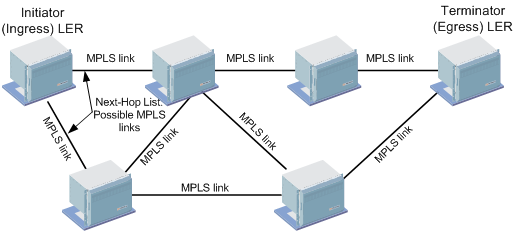
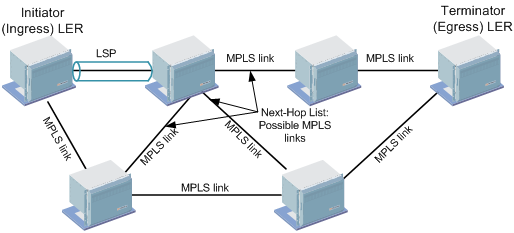
− When the user selects a next-hop link, the hop is added to the path, the bandwidth is reserved for the tunnel and new possible next hop links are shown. This procedure can be repeated until a complete path is defined.
• Automatic Routing automatically creates a complete LSP based on the cheapest route between the Initiator and Terminator.
− All the MPLS-TP links along the possible routes to destination have enough available bandwidth.
− The selected route has a minimal metric, which is computed by adding the link costs charged for all the connections along the route.
− The arbitrary metric values are typically single integers with lower values indicating better paths. Example of recommended costs are as follows:
Link Speed | Cost |
|---|---|
10 Gbit/s | 2 |
1 Gbit/s | 4 |
100 Mbit/s | 19 |
10 Mbit/s | 100 |
The figure below shows an example of calculated path after automatic routing.
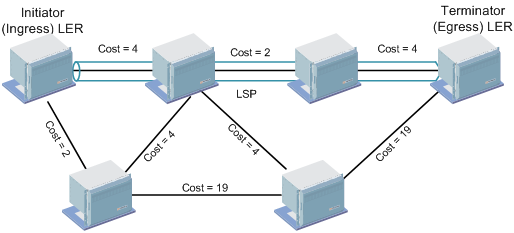
− If a Tunnel template is used, the automatic routing engine creates a complete LSP automatically based on the configured Automatic Routing Parameters of the template.
• Advanced Routing creates a complete LSP automatically based on the configured Automatic Routing Parameters.
Advanced Routing allows the network operator to define constraints other than the path cost in calculating the LSP path. The key aim of Advanced Routing is to distribute traffic across the links to ensure that the load is shared. The bandwidth utilization should not exceed the link’s available bandwidth.
The following network constraints can be configured by the operator:
Routing Order
The operator can select one of the routing orders:
− “BW_Optimized” takes into account the current bandwidth utilization. The administrative cost is ignored. The calculated path uses the less utilized links.
− “Cheapest” (Default) takes into account the administrative cost of the link. The calculated path has the lowest overall cost in the network. Current bandwidth utilization and number of hops are not taken into consideration.
− “Shortest” takes into account the number of hops on the path. Calculated path has the lowest number of hops in the network. Current bandwidth utilization and cost are not taken into consideration.
Note:
The Cheapest and Shortest routing orders take into account the bandwidth in a way that it is prohibited to exceed the link’s available bandwidth.
Additional network constraints listed below can be used together with the routing order:
− Maximum Hop:
The maximum allowed number of hops in the path.
− Maximum Cost:
The maximum allowed cost of the total path.
− Excluded NEs:
The list of nodes for the LSP path to avoid.
− Included NEs:
The ordered list of node hops for the LSP path to go through.
Note:
If this constraint is used, the maximum hop and maximum cost constraints are disabled.
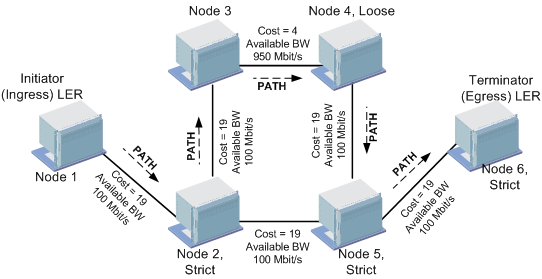
The sample network below has already one LSP established between Node 1 and Node 6 reserving 50 Mbit/s of bandwidth. Assume that the routing engine needs to find a path for another LSP with requirements:
− 60 Mbit/s of reserved bandwidth,
− routing order: cheapest (use the cheapest route),
− included NEs: Node 2, Node 4, Node 5.
The routing engine starts the process by pruning the links that do not meet the reserved bandwidth requirement of 60 Mbit/s.
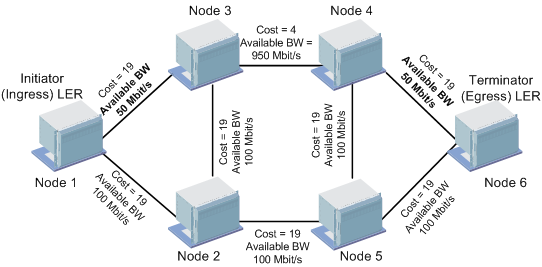
The following network constraints are considered in the path calculation towards the Terminator node:
− explicit-path constraints.
The routing engine uses the Included NE’s ordered lists of nodes as input to form an explicit route. FOXMAN‑UN applies the concept of Explicit Route Order (ERO) based on RFC 3209. Explicit routes are specified as a well-ordered series of node hops. The LSP traverses the nodes in the order that they are specified in the explicit route. The node hops in the explicit route may each be defined by the routing engine as strict or loose. Loose and strict nodes are always interpreted relative to their prior nodes.
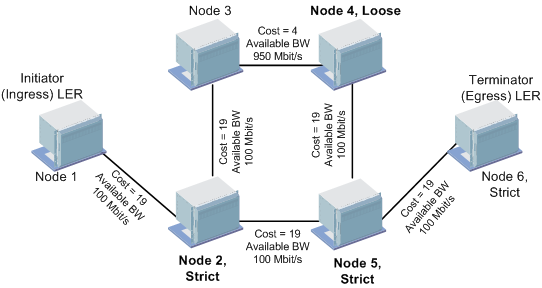
If a node is strict, it has to be a direct neighbor of the previous node.
If a node hop is loose, it does not have to be a direct neighbor of the previous node and the routing engine may fill in additional nodes in between necessary to reach a loose node hop.
Node 2 is defined as strict hop node because it is an intermediate node next to the Initiator node. Node 4 is defined as loose hop node because it is not a direct neighbor of previous node (Node 2).
− the metric (cost) of each remaining links.
The ERO list of node hops is used as an input to decide the route that the PATH message must travel. The Initiator node calculates the immediate next-hop node of the LSP path by consulting the ERO. It then sends a PATH message to that immediate next hop node (Node 2) using a direct link with lowest cost.
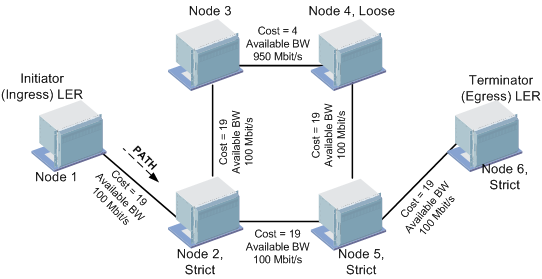
This link is then excluded from the next hop calculation as a link can only be used once in an LSP Path. Node 2, then processes and regenerates the PATH message and sends it using the lowest cost to Node 4. In this example, the routing engine selects the route “Node 2-Node 3-Node 4” since it has lower cost compared to the route “Node 2-Node 5-Node 4”. The used links are then excluded from the next hop calculation.
This process continues until the PATH message reaches the Terminator node.