
Checking L2 Status
Layer 2 is a property that can be enabled/disabled/wrongly configured/properly configured per CE.
To check the status you need to go to the CE details and see the status of the L2 configuration for that specific CE:
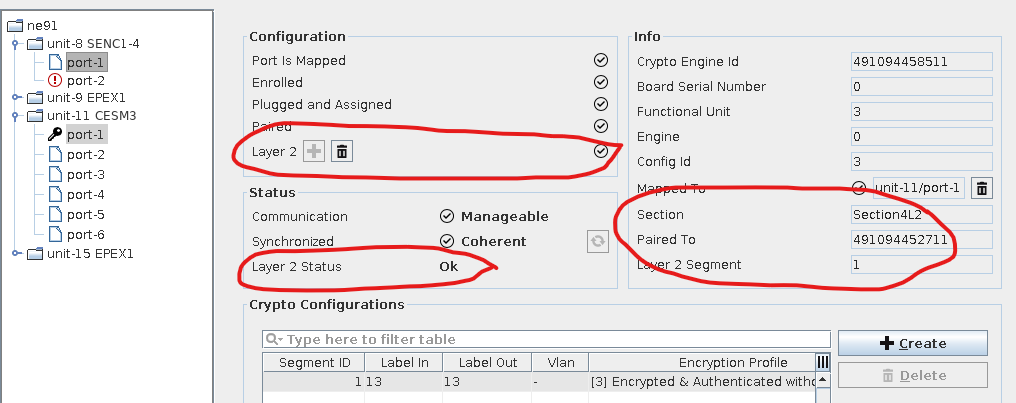
View L2 Status of Specific CE
At this point you can see all L2 related information for that specific CE:
• Configuration: Layer2: is there a L2 configuration for the selected CE?
• Status: Is the configuration in proper status?
• Has the CE a valid related section?
• To which CE is the current one paired? (via mappings and sections)
• Which one is the Crypto Segment describing the current L2 configuration?
There are other places in the system where you can check the L2 status:
• CE tab: Here you can see whether a specific CE has a L2 configuration (we don't know at this point the status of the L2 configuration).
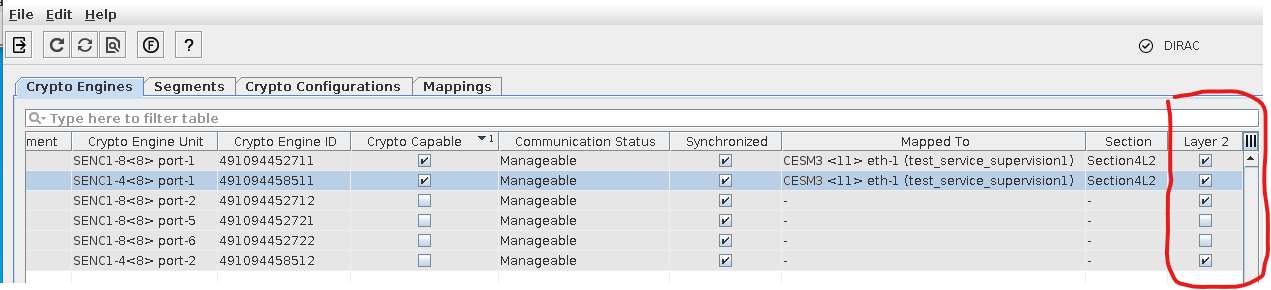
Check Status of L2 Encryption in ESM - CE Tab
• Segment tab: If you sort rows based on the L2 column, you will see all Crypto Segments which are defining the L2 configuration. You can check the required CE by filtering A-End or Z-End points.
The status of the segments is also specifying the status of the L2 Crypto Configuration.
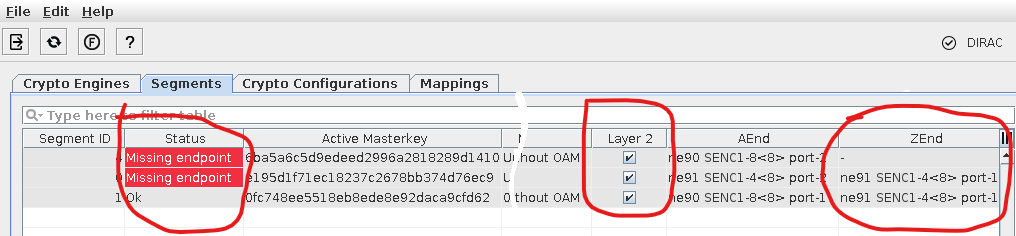
L2 Encryption Status in ESM - Segments
• Crypto Configuration: This refers to the defined L2 configuration on each of the CEs; here you are not able to see any information of the status or of the link information between 2 CEs; nevertheless you can filter to see L2 information of specific CEs:

L2 Information in Crypto Configuration Tab (Filtered)