
SENC1 FU Disenrollment
“Remove from Dirac” is doing exactly what it says: it removes all known information for the selected FU from DIRAC. It will neither move any data from the SENC1 itself or from the Node.
This operation is required to be done always when a FU will not be used any longer in the system in cases such as replacement of a unit, defective unit, old unit, or wrong FU added to DIRAC.
In order to execute the “Remove from Dirac” operation, you can do this via selecting all units in the FU View list and clicking on the “remove from Dirac” button, or selecting one specific FU and doing the same:
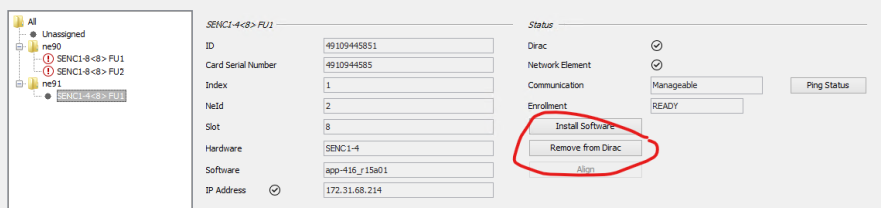
ESM - “Remove from Dirac” for single CE

ESM - “Remove from Dirac” for CE in the list of CEs

Please note:
• Remember that DIRAC does not support two FUs with the same IP address. If one FU is already in DIRAC with an IP address, the enrollment of another FU which has the same IP address will fail.
→ Please first remove the old unit.
• Operations on multiple FUs can only be performed as long as the passwords are the same for all units!