
Channel (TS) selection
Once routed, the Circuit knows on which hops the end-to-end signals are multiplexed. One more step is required to definitely have the signal going from A to Z which means from NE82 to NE80.
A dedicated Time Slot TS has to be selected in all Trails of the Path.
There are two possibilities
− Automatic channel selection based on residual capacity of each Trail, or
− Manual Section.

Please note:
It is recommended to use the automatic channel selection process.
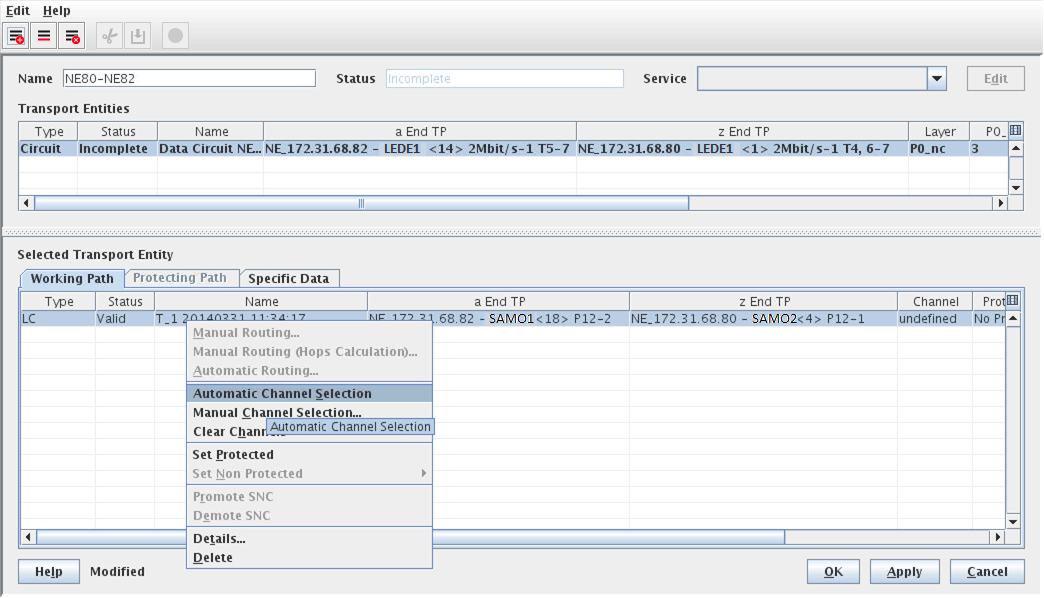
The routed Circuit
To allow the automatic or manual channel allocation, right-click on the Working Path’s “LC” entry as shown in the screenshot above. This calls the context menus:
Automatic Channel Selection | Selects a channel automatically. Allows the FOXMAN-UN NP to search for all possible hops having enough capacity for the service to be routed. |
Manual Channel Selection | Calls the Select Possible Channels dialog, which displays a list of all possible channels to manually choose from. |
Clear Channels | Clear the channels from the path elements. |