
New Transport Entity
The Endpoint of the location A End and Z End has to be specified first.
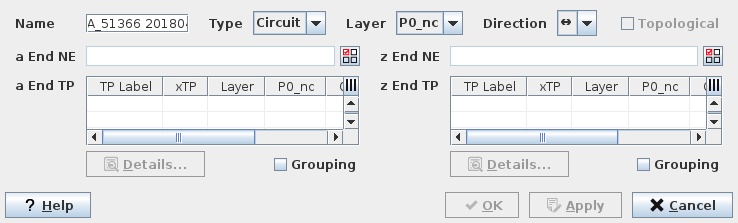
The TE Endpoints
The following menu points are available:
Type | Defines the type of TE. Possible entries are Circuit, Trail or SNC. |
Name | Any string to help identify the new Transport Entity. |
Layer | Specifies the bit rate used for this TE. Only a possible layer rate for each TE type can be selected. |
Directionality | Possible entries are Unidirectional ( -> ) or Bidirectional ( <-> ). |
a End NE/z End NE | Calls the Select NE dialog to select the A End NE/Z End NE. |
a End TP z End TP | a End/Z End Termination Point (TP) Browser table. Note: The TPs of the selected NE will automatically appear on the TP Browser table. |
Details | Calls the TTP Trail Termination Point dialog for the selected TP label. |
Grouping | When more than one Endpoints are selected, each Endpoint will be used as extremity for Circuit. When the checkbox is selected, the NP will group selected endpoints to create one TE. |
Help | Calls the FOXMAN-UN help viewer and opens this page. |
OK | Applies the modifications and closes the dialog. With «OK» the Circuit will be established in the FOXMAN-UN NP database The Circuit itself remains as a 'hole'. The Route is said to be incomplete. |
Apply | Applies the modifications without closing the dialog. With «Apply» the Circuit will be established in the FOXMAN-UN NP database The Circuit itself remains as a 'hole'. The Route is said to be incomplete. |
Cancel | Closes the dialog without applying the modifications. |
In our example the data service we are going to provision is based on the Type of Circuit and uses a bandwidth of a P0_nc layered structure.