
Filter
The concept of FOXMAN-UN NP contains five different filters as listed below:
− Transport Entity Information,
− Application Information,
− Route Information,
− Customer Information,
− Path Protection Information.
The filter entries provide the possibility to search for particular information regarding the network in order to retrieve and display only Applications or Transport Entities that meet the selected filter search criteria. This limits the amount of data that must be displayed and therefore improves the updating performance of the GUI.

Please note:
The maximum number of Applications to be retrieved can be configured in the file /opt/nem/etc/np.conf. The default value is set to “np_querylistmaxsize 10000". A filter set to * (wild card operator) does not filter.
Please note:
A filter set to * (wild card operator) does not filter.
Transport Entity
The NP Transport Entity contains filters to retrieve Transport Entities based on end-to-end filter types:
− Name,
− CPE Trails,
− Type,
− Layer,
− P0_nc,
− Topological,
− Fixed,
− Status.
Application
It allows the search of a particular Application in the network. This end-to-end detail of the Applications can be of a TE type: Trail, SNC Circuit, Unknown. The Application filter provides 3 sub-filters:
− Name,
− Manager,
− Service.
Route
It used to filter the Application based on the TEs’ Routing Information.
The NP Route Information lists the TE's Routing information in the application. It is used to display the end-to-end routing details that have been added in FOXMAN-UN application of types: With Direct, Through Direct, With All, Through All, Term At, Don't Care.
It bridges the gap between the FOXMAN-UN BP and the FOXMAN-UN NP manual alarm correlation. In some cases it is necessary to find the relation between a unit or a sub unit alarm to their used transport layer.
Customer
The NP Customer Information lists the Customer specific information for the particular application. It is used to display the end-to-end circuit details. Any circuit used by customer can be listed/filtered by the specific data information criteria, as specified in the Customer and/or Note sub-filters.
Path
The NP Path Protection Information lists the TE's Path Protection information in the application. It is used to display the Protected and the Not Protected paths. There is also a Protection Mode criterion available for filter.
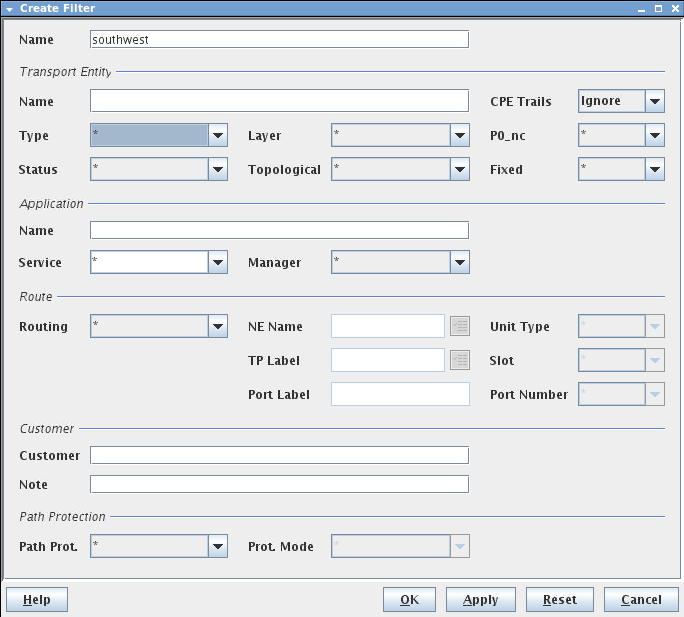
Name | Specifies Name of the Filter. Note: The Name must be unique and shall not contain characters like []/|*?{}= |
Transport Entity | |
Name | Specifies the name of the Transport Entity. Generic forms are accepted (e.g. ‘*Line’ ‘*ISDN*’). |
CPE Trails | - Ignore, - Include. |
Type | Specifies the type of Transport Entity: - * (no filter), - Unknown, - Trail, - SNC, - Circuit. |
Layer | Specifies the layer of the Transport Entity: - * (no filter), - STM1 MSP, P0_nc, VC12, etc. |
P0_nc | Specifies the capacity of the Transport Entity. This filter is applicable on TEs where layer is P12 or P0_nc: - * (no filter), - 1 .. 32. |
Status | Specifies the Status of the TE: - * (no filter), - Valid: the NP managed object is fully supported by resources in the network. - Waiting: the NP managed object is fully defined and scheduled to be downloaded later in the network. - Invalid: the NP managed object is not supported by some resources in the network. - Based Invalid: the NP managed object is based on other application with invalid state. - Incomplete: the NP managed object is not fully defined and cannot be scheduled for download. - Based Incomplete: the NP managed object is based on other application with incomplete state. |
Topological | Specifies if the TE is: - * (no filter), - Topological: represents the physical connection between two TTP that are external ports. - Not Topological. |
Fixed | Specifies if the TE is: - * (no filter), - Fixed; the user can not delete the Matrix Connection (MC). - Not Fixed. |
Application | |
Name | Specifies the name of the Application. |
Service | Specifies the type of service: - * (no filter), - Service 1, - Service 2, - Service 3, Note: By default, Service 1 to 3 are defined. The number of the Services can be enhanced by adapting the np.conf file (/opt/nem/etc/np.conf). For each Application a service level can be allocated (e.g. Voice, Data, Leased Line). |
Manager | Specifies the manager who is responsible for the provisioned Application. If FOXMAN-UN NP has provisioned such an Application, the Manager is of type 'NP'. If it is FOXMAN-UN BP or CST in the field, the manager of the provisioned Application is of type 'Other'. |
Route | |
Routing | Specifies the routing criteria as described below: - * (no filter), - With Direct: retrieves any Transport Entity which path goes through specified Termination point or NE. - Since only the TE path is considered, the retrieve TEs are those with the same layer rate specified in the Termination Point. - Through Direct: same as “With Direct” but the TE extremities are not considered in the search. - With All: retrieves any TE which path goes through or is multiplexed in a specified TP or NE. - Retrieved TEs may have different layer rate than the specified TP. - Ex. if an E1 port is specified, all P0/P0_nc TEs, which are multiplexed through the port are retrieved. - Through All: same as “With All” but the TE extremities are not considered in the search. - Term At: retrieves any TE (Circuit/Trail/SNC) which A or Z extremity in the specified Termination Point or NE name. |
NE Name | Specifies the name of the FOX51x or FOX61x NE. Likewise, the NP Select NEs dialog can be launched by clicking on the icon next to the NE Name field. |
Port Label | Specifies the Port Label. Note: The Port Label can be modified via the CST, otherwise the default port label can be used. |
TP Label | Specifies the Termination Point Label (Sub-unit of a Unit). The TP label is selected from the TP Browser dialog, This can be launched by clicking on the icon next to the TP label field. |
Unit Type | Specifies a unit for the specified or selected NE. |
Slot | Specifies the slot position of the unit type selected in the NE subrack. |
Port Number | Specifies the port number of the unit type selected. |
Customer | |
Customer | Specifies the customer name who owns the Application as defined in the Specific Data menu. |
Note | Specifies the End Point Data (EP Data) or Circuit Information Value as defined in the Specific Data menu. |
Path Protection | |
Path Prot | Specifies the protection mode of the Application: - * (no filter), - Protected, - Not Protected. |
Prot. Mode | In a protected Application, the following values can be associated: - * (no filter), - SNC/I, - SNC/N, - LTP. |
OK | Creates the Filter and closes the dialog. |
Apply | Creates the Filter without closing the dialog. |
Reset | Returns the attributes of the dialog back to their default values. |
Cancel | Closes the dialog without creating the Filter. |
Help | Calls the help viewer and opens this page. |