
Networking Package Data Consistency Checks
Check points are implemented to keep data consistency between the Basic Package (BP), the Networking Package (NP) and the Edit sessions in the NP.
An overview of the operation is provided below:
Check 1: The NP Database and BP Database synchronization.
In order for the FOXMAN-UN NP to work properly, the NP database must be synchronized with the BP database, in which the provisioned state of the network is stored.
• The following network element changes (trail information changes) are discovered by the BP and updates the BP database accordingly:
− a network element is added to the network;
− a service unit is removed or reconfigured;
− section is created;
− cross-connection is created or deleted.
• BP Event Notifications
The NP database is kept synchronised with the real network through the notification mechanism. The BP notifies the NP process when BP trail information changes.
• The NP/BP sync is triggered every trail information change (e.g. matrix connection). It does not wait until the network element configuration is “saved” via FOXCST/UCST.
• NP processes each Event notification to:
− Recognize new/existing TEs;
− Delete existing TEs based on removed physical elements;
− Complete the existing TEs with the new connectivity.
• Resynchronization Process, npresynch:
The NP-BP database synchronization is normally achieved automatically. In the rare occurrence that there is a synchronization problem, the command npresynch needs to be executed.

During the resynchronization phase, it is mandatory not to work with FOXMAN-UN NP.
Check 2: Log Objects.
For every change required in the network element, the NP-core is creating a log object. This log object is deleted, when the corresponding BP object create/update/delete notification is received.
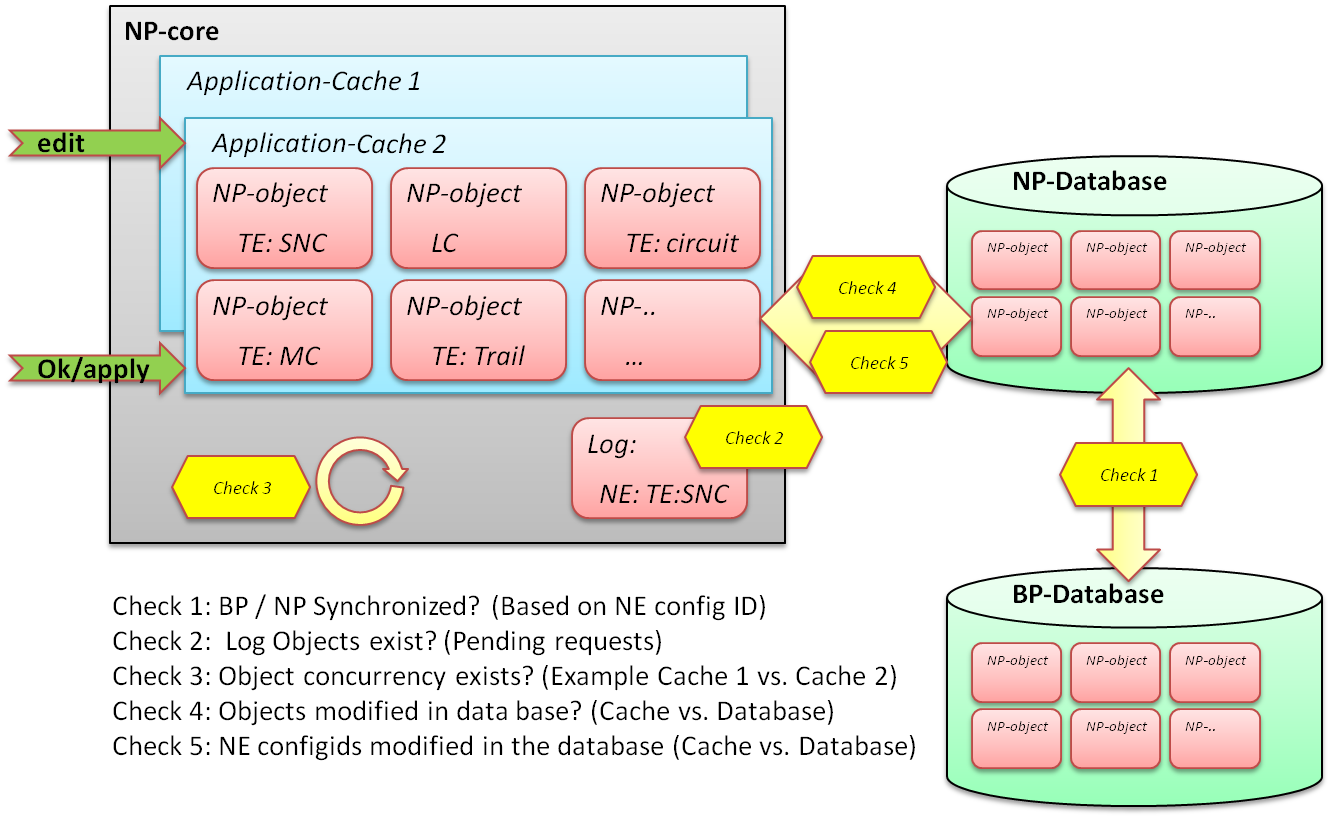
NP Data Consistency Checks
Check 3: Concurrency Check (Cache 1 vs. Cache 2).
An NP Application Edit session will always create a cache of the objects pertaining to the Application. All user modifications on an Application are done in this cache and committed to the database when the user leaves the Application Edit session with “OK/Apply”.
Simultaneous Application Edits are allowed as long as the concurrent users are not editing the same network element (the same NE loaded in both users’ Caches).
Check 4: (Cache vs. Database, unsaved changes).
The user’s (e.g. User 1) Application cache loaded objects are no longer up-to-date compared with the NP Database objects. This situation could be the result of:
− A FOXMAN-UN user (e.g. User 2) edits the same NE already loaded in the User 1 Application Cache via UCST or FOXCST.
The unsaved object changes (e.g. cross-connection creation) in the network element is discovered by BP and updates the BP database. The BP notifies the NP process and updates the NP database. The loaded objects in User 1 Application Cache, however, are not updated.
Check 5: (Cache vs. Database, saved changes).
The user’s (e.g. User 1) Application cache loaded NE configid is no longer up-to-date compared with the NP Database. This situation could be the result of:
− Another user (e.g. User 2) has successfully committed his changes to an NE, which is already loaded in the User 1 Application Cache.
The NE configid in NP and BP databases is updated, but not the loaded NE configid in User 1 Application Cache.

Please note:
NP users commit their changes to the NE via NP Application Edit “OK/Apply”, whereas FOXMAN-UN users commit via FOXCST or UCST “Save to NE”.