Configuration for RADIUS Authenticated Users
FOXMAN‑UN needs the following userclasses for access to a FOX61x node:
• Manager,
• SessionManager.
For this access, FOXMAN‑UN uses two dedicated users for the initial connection of a HLM which are defined with default settings and should be changed via an entry in nem.conf.
Userclass | default | nem.conf tag | ||
|---|---|---|---|---|
username | password | username | password | |
Manager | nemadm | nemadm | nem_remote_auth_admin_user | nem_remote_auth_admin_user_pwd |
SessionManager | sessionmanager | sessionmanager | nem_remote_auth_session_user | nem_remote_auth_session_user_pwd |
For security reasons it is strongly recommended to change the defaults from the beginning and use a dedicated user for manager and for sessionmanager.
To adapt these default usernames and passwords to usernames and passwords which are available on installation side the following steps have to be done:
1 create encrypted passwords with stringtool:
/opt/nem/bin/stringtool <password >
Example:
/opt/nem/bin/stringtool nemadm
7E1C4B1DE2EA7879
/opt/nem/bin/stringtool sessionmanager
B261E2B152ECADD7EF40733064D77107
2 insert usernames / passwords into nem.conf:
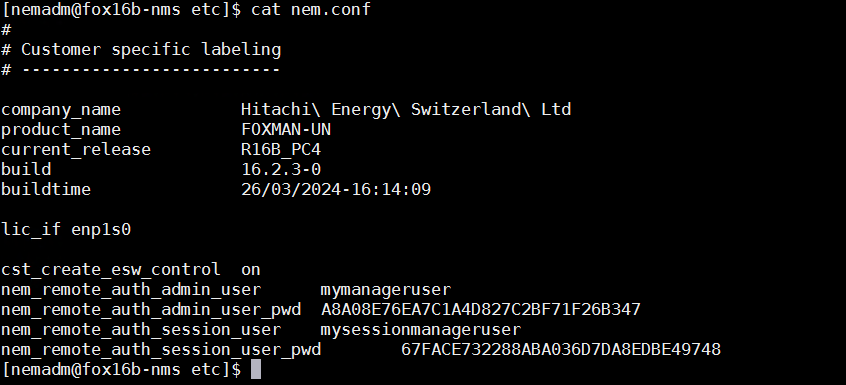
nem_remote_auth_admin_user mymanageruser
nem_remote_auth_admin_user_pwd 7E1C4B1DE2EA7879
nem_remote_auth_session_user mysessionmanageruser
nem_remote_auth_session_user_pwd B261E2B152ECADD7EF40733064D77107
3 To apply the settings, restart FOXMAN‑UN by executing “nemstop”, followed by “nemstart”.
Sample setup for nem.conf:
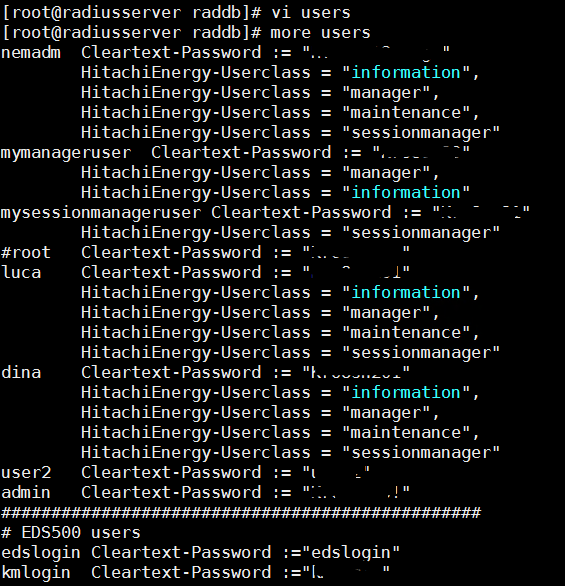
Sample setup for RADIUS configuration: