
Start/Stop Services
This function reports the status of the FOXMAN‑UN services and provides commands to start and/or stop services. It allows you to:
• Show all FOXMAN‑UN services (i.e. base services, core services, and additional services like e.g. DIRAC services, depending on license options) with their name, description, selection for restart, restart indication, state, start date, and run time;
• Restart selected services;
• Start NEM core services;
• Stop NEM core services;
• Execute NP Resynchronization with BP NE data: this will re-synchronize all NEs, FOs, and sections in the database;
• Show Element Agents.
You can refresh the services status via the “Refresh Services Info” button.
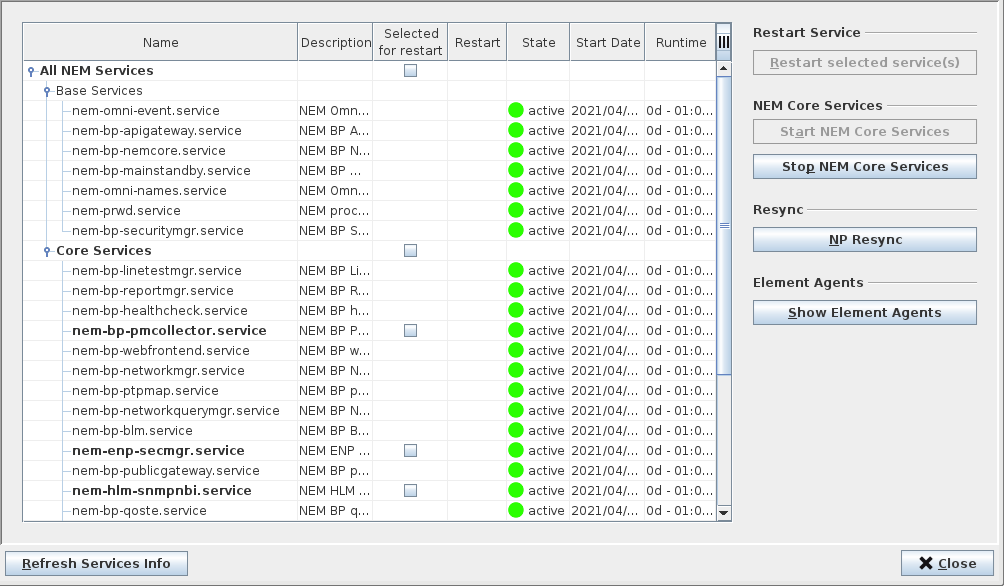
Services Management dialog
The most likely reasons for using the “Start/Stop Services” function are:
• To display the current status of the FOXMAN‑UN system (the command “lsnem” also shows these status indications).
• To stop the FOXMAN‑UN system for restoring the database from the backup (the FOXMAN‑UN core must be inactive for this process).
• To stop and restart just the core for the purpose of activating changes made to the configuration file “nem.conf”.
• To try and recover from some error conditions (indicated for instance by deteriorated performance) by stopping and restarting the system or selected services.